


Editor's review
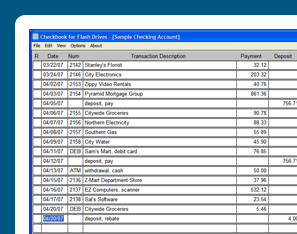
Checkbook is an electronic checkbook register which runs completely from your flash drive. You can run this portable version from any computer and keep your checkbook transactions with you at all times.
Features: Checkbook for Flash Drives runs completely from your flash drive. You can keep your checkbook transactions with you at all times, whether you are at home or at work. You enter transactions as they happen and when your monthly statement arrives balancing becomes easy work. As this is no complicated accounting package, your learning time is very small. It has the option of password protection. When you load Checkbook for Flash Drives, you will be given the option to "Create New Account”, "Open Existing Account", or "Open Most Recently Used Account". You may want to first select "Open Existing Account" and view the sample account that is included with Checkbook for Flash Drives. This will familiarize you with the format used to record transactions.
When you are ready to set up your own account your option is "Create New Account". Start from the last bank statement that you used to balance your checking account. You will need this to enter information required for setting up a new account. The first information you will need to enter is a name for this checking account. Enter a name that will help you identify the name of this account easily. You may want to use your own name or your bank`s name. Next, enter the current balance that is shown on your bank statement. This is sometimes called "New Balance" or "Ending Balance." Date format is selectable. The saved file is located in the CKdata folder on your flash drive. You will want to periodically backup your Checkbook data files.
Overall: Quite a handy utility for a portable checkbook balancing.
User comments