


Editor's review
This piece of software is an add-in to Excel and provides the capability to create Code 128 barcode labels for your business use.
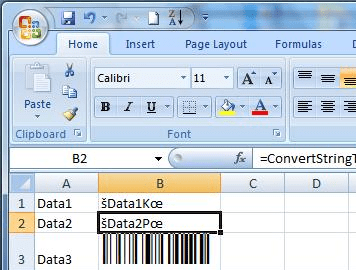
This software solution provides an add-in to MS Excel that lets you create barcode labels in Code 128. If you need to create such labels frequently, this is an easy solution for you rather than investing in a standalone application. The free code 128 barcode font is included in the Excel barcode add in installer. Installation is easy. Simply download the Excel barcode add in and run the setup file. After your initial installation, open Excel and go to Tools menu and select Add Ins. You have to select the check box against the add-in. After restart and having started Excel, you`ll have access to the add-in. Creating a code is simple as click in the cell you want your barcode, select the "ConvertStringToCode128" function. This would be typically like writing formula in normal Excel usage. Then, as the DataString argument, select the cell whose data you want encoded. You will need to set the cell`s font to "code128bwin" or "code128bwinlarge".
The use environment is simple. Most of us are familiar with the Excel workspace. The Code 128 specification includes more characters, upper and lower case, and numbers, and punctuation than any other barcode and that`s the reason the developer supports only this font as most often this is all you need. Barcode images are often made at screen resolution so when they are printed they are blocky and can cause scanner errors. This application makes sure the labels are printed at high resolution and not to cause such scan errors. A similar add-in is available for use with Word also. Thus if you have barcode label printing needs in volume and can get by using only the code 128 fonts then this is the tool for you.
User comments