


Editor's review
While creating documents relating to your goods or products in MS Word, you may find the need to insert barcodes in them. This usually becomes a hectic affair as Ms Word does not contain any such function to create barcodes within the document. Alternately creating and copying the barcode image into the document does not give it a presentable appearance. Well the good news is that you can now create the barcodes right in MS Word, and place and configure them as per your requirements with the help of the Code 128 Word Barcode Add In 1.0.1, which essentially is an add-in tool for Word. The tool provides its users both floating and inline barcodes for easy placement with Word documents. The process of adding barcodes to Word is even easier and requires you to perform some simple selections.
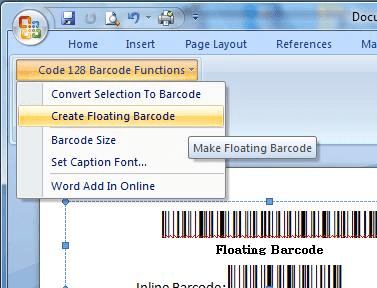
Once you have installed Code 128 Word Barcode Add In 1.0.1 it displays the ‘Code 128 Barcode Functions’ option with Word toolbar from where you can easily access and use it to insert the barcodes. It consists of various option; Convert Selection To Barcode, Create Floating Barcode, Barcode Size, Set Caption Font, and Word Add In Online. To form a barcode you simply need to select the text for converting it into barcode and then run the macro named ‘ConvertToCode128’. The application automatically adds start, stop, & check digit and also changes the font to a barcode. Features like ‘Create Floating Barcode’ helps in barcodes creation, and you can select the size and caption font as required. The barcode is added to the word document, where you can easily drag it to any suitable position. Using the tool it’s easy to create any of the inline and floating barcodes to be placed in your document.
Code 128 Word Barcode Add In 1.0.1 eliminates the efforts you need to put in to copy and paste image barcodes from barcode fonts and websites. The application earns a score of 3.5 rating points for making it convenient for its users to effortlessly create barcodes within Word and place them according to the requirements.
User comments