


Editor's review
While working you might have to deal with different forms and there may be so many of them to work with. If many of them are the scanned ones, than it often becomes hard to fill the forms exactly in the desired manner. If you have to regularly tackle numerous forms then there’s something that can help you well with it. Bytescout Form Filler 1.10 software would prove to be a right choice for you to fill a variety of forms with effortless ease. It provides you with such simple options to work with that you can start operating the program in no time.
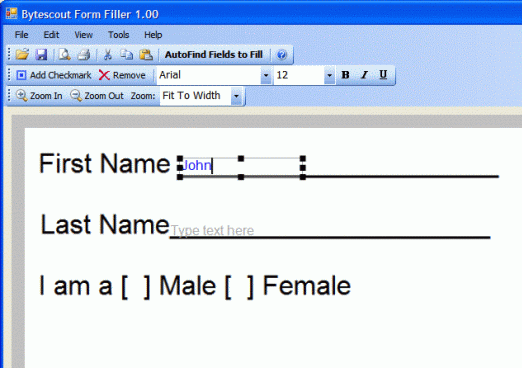
Bytescout Form Filler 1.10 is easy to download and even the installation requires only a few steps to be followed. The appearance of the software is like any other Windows applications hence you would feel familiar while working on it. You need to load the forms with the image format or the document. Then some features are shown to process the image or documents relating to different aspects. The toolbar shows the option for ‘AutoFind Fields to Fill’ with which you can find the text fields. After clicking the option the process starts and then you get a text box tool appearing on the screen. You just need to place the tool at the place and fill the form with the required information. If there are any selection fields in the form then you can place the check marks easily with the given option. While filling up the various forms you need to insert your picture also, not to worry you can have the picture added to the form. You can position the text check mark or image, etc by moving them. Have the form fit to the page size, or width, etc for properly viewing it. You can change the ‘PDF Settings’ option to your preferences and make the program work accordingly. For any further assistance Help File of the program is there for guiding you.
Bytescout Form Filler 1.10 is provided with exclusive features for filling up the form with much of ease. The rating points for the software have been set at 4 for the effective assistance that it provides you and completing the tasks in a neat manner.
User comments