
Free Downloads Center
e.g. RFFlow Flowchart Software 5.05

Categories

Latest Reviews

AlphaEZCam

AlphaEZCam
AlphaEZCam is a fully functional webcam application that has the capability to manage multiple cameras and upload images to web servers.

AirGrab WiFi Radar

AirGrab WiFi Radar
AirGrab WiFi Radar is a highly efficient tool for displaying and providing you access to the Apple Airport base stations and other WiFi wireless access points.

Subscribe

RFFlow Flowchart Software 5.05 Download

Editor's rating  
Users' rating   (1 votes) Rate it!
License Shareware / $49.00
Downloads 3773
Publisher Roger Faaborg
File size 5315K
Date added 29-Oct-2009
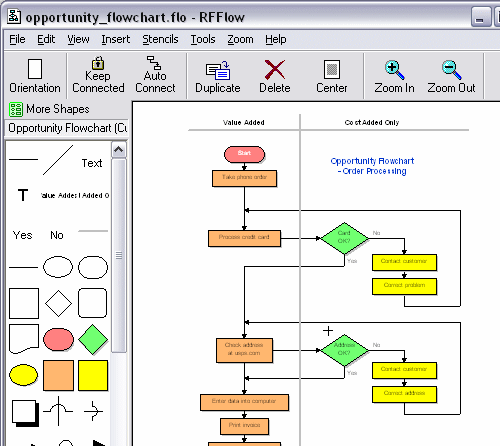
RFFlow Flowchart Software screenshot

Enlarge screenshot

Publisher's description
Editor's review
Submit your review

RFFlow is a graphics program for creating a wide variety of flowcharts, organization charts, and other diagrams. It's easy to draw and edit charts with RFFlow. Simply drag a shape from a stencil to your chart. Shapes in RFFlow will automatically size around your text. Right-click on a shape or line to edit its properties. RFFlow includes over 1600 shapes that are carefully organized into stencils designed for specific tasks. The stencils are arranged in an expandable list that allows you to quickly find the stencil or shape you want. Each shape has a tooltip displaying its name or description. RFFlow has stencils for audit objects, brackets, cause-effect (fishbone) diagrams, computer/network design, CPM charts, criminal investigation diagrams, data flow diagrams, database definitions, electrical/electronics, entity relationship diagrams, flowcharting (basic flowcharting, DIN66001, physical flowcharting), fluid power design, Gantt charts, genetic pedigree charts, Graham process flow, Greek alphabet, IDEF0, IDEF1X, industrial objects, office layouts, organization charts, pert charts, quality system/ISO 9000 charts, SDL charts, software design (UML, Booch, Gane/Sarson, Shlaer-Mellor OOA,Yourdan, and others), structure charts, timelines, transportation objects and WBS charts. You can use the RFFlow stencils or create your own custom stencils with just the shapes and lines you need. You can insert pictures and clip art pictures from files or from the Clipboard and add them to a custom stencil. You can also draw your own custom shapes in RFFlow and add them to a stencil. Text is entered and formatted just like it is in your word processor. RFFlow is an OLE server so you can easily copy and paste your charts into Microsoft Word or other Windows applications. You can embed or link your chart. RFFlow allows you to save your charts in GIF, JPEG, and HTML formats for use on Web sites. Technical support is free and unlimited.

Editor review: Reviewer, 2009-02-04 10:25:00

Any information that is supported with graphical figures lays a great impact on others than a simple textual presentation. Graphical presentations are interesting as they are easy to follow and can quickly update a reader on numerous aspects. However creating such graphical presentation that includes charts, flowcharts and diagrams may take a lot of time. But, your time and efforts can be saved from by trying out the new RFFlow Flowchart Software 5.04. It’s a graphics program that facilitates creation of wide range of flowcharts, diagram, and charts for various purposes. Using the varied tools provided with application you can draw and edit different shapes, and place them at desired position to form charts or diagrams. It even associates up to 1600 distinct shapes for easy usage, as they are or by altering them.

RFFlow Flowchart Software 5.04 offers an effective set of options which support users in forming flowcharts, diagrams, etc in quick time. Launch the application and begin with dragging and dropping a shape from left pane to the functioning area on right. Next for inserting text you can double click the shape, which opens a window for you to type-in the text with desired customization. However, with the ready made flowcharts, you can insert new shapes, delete existing ones, move them to necessary position, and alter size, color, lines, style, shape operation in stencil, rotation, header, layers, etc. Even the shapes can be linked with exe or data file, and disabled from being printed, selected or moved. Besides the ready to use diagrams and charts, you can form your own charts using the shapes and customization features. By using the ‘Run RFShape’ option, you can create your own shapes and store them for further usage. In addition to these features, the program offers various others such as Keep Connected, Auto Connect, Align, Space, Duplicate, Orientation, Stencils, Color Scheme, rulers, full-screen along with many others.

With the RFFlow Flowchart Software 5.04, it becomes extremely simple for the users to create flowcharts, diagrams, and charts that can be customized to suit their requirement relating to the data presentation. Keeping into consideration, the varied tools integrated with the application, which facilitate remarkable performance, makes it worth a score of 4.5 rating points.

Visit homepage of RFFlow Flowchart Software

Download RFFlow Flowchart Software 5.05


edit iso
uml tool
microsoft word to jpeg
windows xp iso
files to iso
what are iso files
iso files
clip files
power iso
chart flow

Programs related to RFFlow Flowchart Software

Copyright © 2001-2009, Free Downloads Center.