


Editor's review
Owing to its easy negotiability and user-friendly options, DBAs or developers tend to record data in text (CSV) format files. But, once the editing task is completed, DBAs look out for appropriate utility for importing that data file to SQL server. However, the task can be easily done with the assistance of TxtToSql 1.3, which proves to be an apt tool for importing data csv files to SQL server within some simple steps. It’s capable of exporting text, ntext and image field, and enable you to run SQL command to view the importing results. The application includes a Wizard that makes the task even easier.
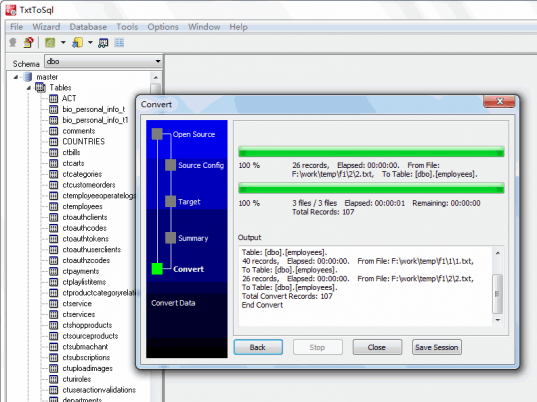
When you launch the TxtToSql 1.3 utility, it requires you to Logon by entering Server, Database, Authentication, User Name, and Password info. Then press ‘Connect’, and the program window appears with options placed on it. Click on the Import File button and you can use ‘Import File Data’ or ‘Import From Folder’ option. Opt any of these, and just make the selections with Import Data Form. Moving with the process, it involves four steps to be followed. With the first step you need to choose a data file through the provided ‘Select Data File’ field. Then, the file is loaded with the program and next you’re required to choose the schema and table. After selecting these, the related data is displayed in the small area on the program screen. Next step in process is to configure the fields, where you can set the Delimiter, Quoted By, Column Count, and other given features. With the final ‘Load data’ option set Load Rows, Skip Rows, Load Type, Errors to Allow, etc options, and then finally use ‘Load’ and ‘Save to Sql’ options, as needed. Similar is the process to load files from the folder. You can view the progress with result preview and log areas. Moreover, you’re also provided with Query, Save/Load session, etc features to further work with the data.
TxtToSql 1.3 makes the task of importing data in text (csv) file to SQL Server truly a cake walk. The application, for the notable performance and credible set of features facilitating the process, has been rated with 3.5 points.
User comments