


Editor's review
With RapidTyping Typing Tutor, learning the art of typing becomes real fun. It’s never been so easy to learn typing in an entertaining way. The best about this software is that it’s very easy to operate and has an appealing interface.
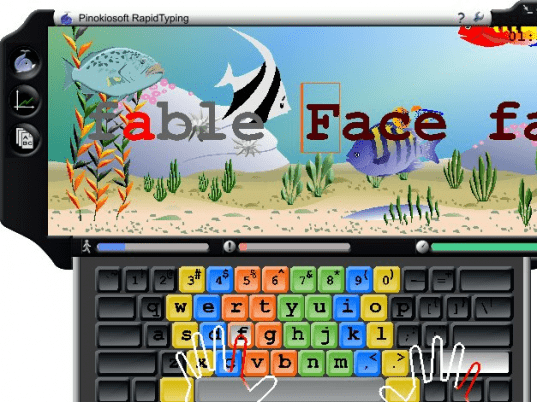
The software is easy to download and gets installed in fewer seconds. It opens up with a screen having an under water world view in a blue frame. On its left side three options appear for current lesson screen, statistics screen and lesson editor view. The very first screen is the current lesson screen that deals with typing. The second option tells about the speed and rate of mistakes. By the third option you can create new lesson all by yourself or select from the given lesson folders. You can change the color of frame according to your choice. Kids would have fun exploring the new creatures as they type in more words. Once you are done with typing the complete lesson the speed, accuracy and time is shown automatically. There are two yellow color options on the top right. The first ‘?’ symbol is for updating of software and the other one is for more options. The options dialog box shows information about the hotkeys, sound options, languages, keyboard, etc. You can create a new user identity to do the typing. The animation can be enabled or disabled according to how you want the typing screen to be. At the bottom of the main screen appear three icons showing the level of, how much text you have type, your mistakes and your speed.
There is hardly any feature that the software fails to address about basic typing. It never even attempts at being sophisticated typing software but rather concentrates on doing basics. Rapid Typing tutor is a good software that the kids and even the grown ups can enjoy. Knowing the features and having a trial would definitely make you own it.
User comments