


Editor's review
Joyfax Server (Network Fax Server Software): Client/server-based application (Fax software) allows you directly to send fax from desktop or other business applications (OA, CRM, and ERP), and receive fax in any computer.
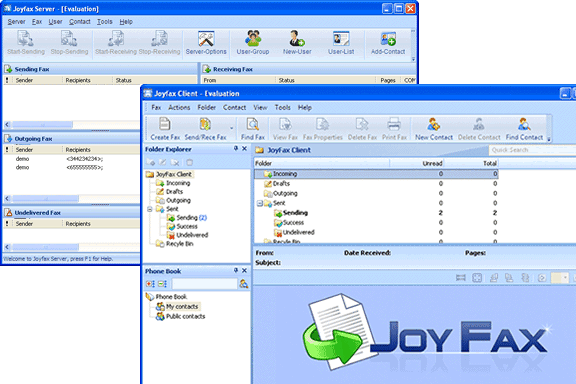
Pros: This application is configured as a client server fax handling system. With that any one client is able to send out a fax to the server and the server distributes incoming faxes by forwarding to the right client desktop. The access to the fax sender being configured as a virtual printer sending faxes is possible from any application that can print a document. Due to the client/server architecture of Joyfax, all faxes are stored centralized on the fax server. A built in database takes care of that. Simple as faxing Virtual printer technology (Joy fax printer) provides effective fax solutions of sending faxes directly from any desktop application that covers applications in OA or CRM or even ERP packages. Applications Microsoft Office, Adobe Reader (PDF), AutoCAD, Lotus etc. Organizations are able to reduce costs, save time, and improve productivity by enabling users to send, receive, and manage faxes directly from desktop. Network-wide access from every workplace is made possible. The two components namely the server and the client are installed easily, modem presence and its settings are detected automatically. The server interface shows faxes being transmitted, if there are incoming faxes, online users, undelivered faxes etc. There’s a statistical option available that shows overall operation clearly. The integrated public contacts manager allows user to share business contact information, including full name, company name, telephone, fax number, e-mail etc.
Server settings help set up the server to send and receive faxes. The contact management facilities on the server can be used by any of the clients on the network. User management functions that help add new user/ manage the user list etc are also administered from the server. Server has the security set up built in.
Cons: No obvious problems here. Possibly has limited use in this day and age of mailing scanned documents.
Overall: Considering the functionality and the ease of use this is good for a rating of 3 stars easily.
User comments