
Free Downloads Center
e.g. 32bit Convert It 08.10.14

Latest Reviews

Visual Importer

Visual Importer
Visual Importer, the only versatile tool that can export, transform or load database data at the rate of 14,347 records per second.

AutoTRAX Design Express

AutoTRAX Design Express
AutoTRAX Design Express is a very useful Electronic Design Suite specially designed for Electronic Engineers.

Subscribe

32bit Convert It 08.10.14 Download

Editor's rating  
Users' rating   (3 votes) Rate it!
License Shareware / $19.99
Downloads 2313
Publisher Bill Krahmer
File size 352K
Date added 19-Oct-2008
32bit Convert It screenshot

Enlarge screenshot

Publisher's description
Editor's review
Submit your review

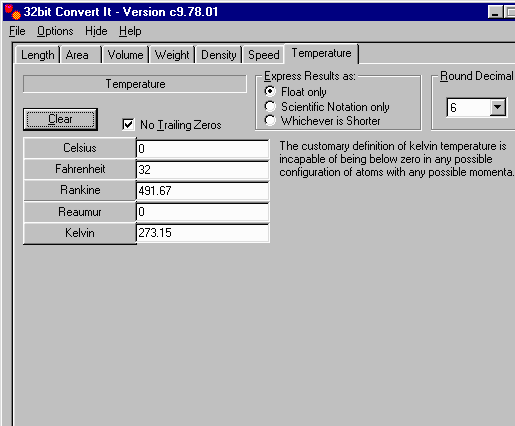
32bit Convert It is a Unit Converter. You can type in values for a unit of measurement while the other units dynamically change to become equal in measurement.

In the main window, you will see the tabs, [Length], [Area], [Volume], [Mass], [Density], and [Speed]. Each tab will contain the different units for measuring the unit type.

Once in a tab, you will see a better description of the item in the top left corner. You can choose how to display the resulting values by choosing from the [Express Result as:] section. You can choose how many decimal places to display by selecting the number from [Round Decimal]. Select [No Trailing Zeros] if you do not want any trailing zeros at the end of the resulting values. Press the [Clear] button to clear the contents from all unit fields.
When you go from tab to tab or even close the program, 32bit Convert It will remember the values in each field so that when you come back, the values will still be displayed as you left them.

Editor review: Reviewer, 2008-08-05 04:37:00

32bit Convert It will Convert any unit of measurement to another unit of measurement including Length, Area, Volume, Mass, Density, and Speed.

Pros: 32bit Convert It is a Unit Converter that converts one unit to another in the same measurement group. The interface is a tabbed one that groups such measurements together. The tabs are marked as length, area, volume, mass, density and speed. A set of measurements applicable to such groups of measurement are listed on these pages. The measurements are arranged as a list with text fields next to them. For conversion from one unit to another you just type in the value in the appropriate text field. All other fields start showing equivalent values in the given unit. For each page there’s a explanatory note on the top left of what measurements are covered in the page. For example the length page has the explanation “length, distance” and the units listed are inches, feet, yards, rod, chains, miles, sea miles, millimeters, centimeters, decimeters, meters and kilometers.

You can choose how to display the resulting values by choosing from the Express Result as section. Options available are float only, the scientific form or whichever is shorter. Number of decimals to be used for rounding to arrive at the result can be specified. Specifying no trailing zeros drops those digits after decimal point. Clear control clears the text fields as a preparatory step for a set of calculations. Unless this specific clear button is used the calculations remain on the display even if tabs are changed or even the program is closed.

Cons: The results display can get confusing with so many values on a page. The ability to choose the input field and an output filed would have been a better option as it’d have avoided the clutter.

Overall a very useful calculator, simple to use and is good for 4 stars.

Visit homepage of 32bit Convert It

Download 32bit Convert It 08.10.14


tab pro
easy unit converter
tab tools
area volume
bill krahmer
measurement conversion
mpeg2 convert
convert avi with subtitle
convert mp4 mpeg
mpg convert flv

Programs related to 32bit Convert It

Copyright © 2001-2009, Free Downloads Center.