


Publisher's description
iRondo is a new kind of image processing application that configures itself around the user and their intended tasks. In designing iRondo, Inlite applied a fresh approach to the design of the user interface. Simply stated, what the user sees includes only the controls that pertain to that task. We call this a profile. The settings for the profile are saved, so that when it is selected again, the settings return. Controls for other tasks are not displayed and are not modified. The learning curve to use iRondo is zero. This approach yields benefits in simplicity and productivity:
- Once technicians set up the profile, operators have the flexibility to modify limited aspects and cannot harm the configuration
- Easier training of operators because they can focus on the task
- Less task debugging because there are no hidden controls
iRondo comes with pre-designed profiles, which can be extended with custom profiles. They include:
- Image Grouping by the value of barcodes on coverpages
- File Renaming based on the value of barcodes found on each page
- Image Repair to correct common scanning defects, such as large, dark borders, noise, upside down images, and skew
- Barcode Reporting, which extracts the value of all barcodes in teh image files and presents them as a CSV file for integration with other apps
- File Merge to collapse a complete directory into a single image file with many pages
- Split Files which puts every page of every file into its own file to make rework Easier
iRondo accepts files in TIFF format and outputs either TIFF or PDF files.
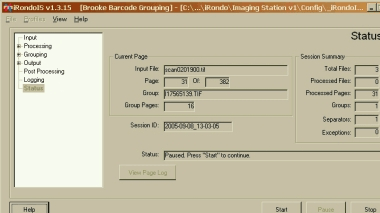
Input files which cannot be read are moved to a processed directory to facilitate rework and reprocessing, while the remaining pages are moved to a Processed directory or are erased, based on user selection. The program status display keeps the operator informed about the status of the job and each file at every step, and allows the operator to pause or halt the processing.
- Once technicians set up the profile, operators have the flexibility to modify limited aspects and cannot harm the configuration
- Easier training of operators because they can focus on the task
- Less task debugging because there are no hidden controls
iRondo comes with pre-designed profiles, which can be extended with custom profiles. They include:
- Image Grouping by the value of barcodes on coverpages
- File Renaming based on the value of barcodes found on each page
- Image Repair to correct common scanning defects, such as large, dark borders, noise, upside down images, and skew
- Barcode Reporting, which extracts the value of all barcodes in teh image files and presents them as a CSV file for integration with other apps
- File Merge to collapse a complete directory into a single image file with many pages
- Split Files which puts every page of every file into its own file to make rework Easier
iRondo accepts files in TIFF format and outputs either TIFF or PDF files.
Input files which cannot be read are moved to a processed directory to facilitate rework and reprocessing, while the remaining pages are moved to a Processed directory or are erased, based on user selection. The program status display keeps the operator informed about the status of the job and each file at every step, and allows the operator to pause or halt the processing.
User comments