
Free Downloads Center
e.g. PDF Split Merge 1.0

Latest Reviews

Asterix and the Great Rescue

Asterix and the Great Rescue
Asterix and the Great Rescue is a fun and fanciful game suitable to all ages with an addictive game-play.

Proposalsmartz Proposal Writing Software

Proposalsmartz Proposal Writing Software
Proposalsmartz Proposal Writing Software is an handy application that allows you to work about smartly with your business proposals and documents.

Subscribe

PDF Split Merge 1.0 Download

Editor's rating  
Users' rating   (1 votes) Rate it!
License Shareware / $24.95
Downloads 2872
Publisher PDF-TIFF-Tools
File size 1639K
Date added 12-Aug-2009
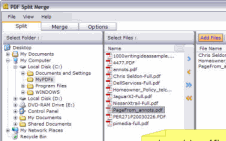
PDF Split Merge screenshot

Enlarge screenshot

Publisher's description
Editor's review
Submit your review

PDF Split Merge - The Fast and Easy way to split and merge PDF documents. It is a stand-alone windows application that can be used to split and merge your PDF files. It allows you to split large PDF files into smaller PDF files and merge one or more PDF files. The split functionality lets you split one or more PDF files based on page groups and page ranges. The merge functionality lets you quickly combine a collection of PDF documents. Adobe Acrobat is NOT required.

Key Features:

* Adobe Acrobat NOT required.
* Split a PDF file into single pages or sets of pages.
* Automates the process of splitting.
* Split PDF documents by page numbers or custom page ranges.
* Merging one or more PDF files.
* Automates the process of merging multiple PDF files.
* Merge, combine, join, append, concatenate PDF documents.
* Rearrange pages in a PDF document.
* Drag and Drop support of files.
* Save and load batch list.

Editor review: Reviewer, 2009-09-16 09:44:00

It is a stand-alone windows application that allows you to split and merge your PDF files. The split function lets you split PDF files based on page ranges and page numbers and randomly any page range or number. Merge PDF documents quickly by sorting and combining a group of files using the merging feature. To perform these functions Adobe Acrobat is not required.

Features: Utility provides interface from a single screen. You can set split and merge options. Options allow you to set your output directory to store the files after splitting. Define your split option by specifying split document into single pages, split by every specified number of pages, Specify page range. For merging you need to set only output file path to store merged file.

To perform split operation, you need to select and add the files which you would like to split. You can save list of files by save list for future reference. Once files are added you can start split operation. After splitting the files will be store in the specified folder. Merging of PDF documents is an easy three step process. Add files, name the output file and then get the merge done in a single click.

Overall: It’s the best simple and faster utility to split and merge PDF documents.

Visit homepage of PDF Split Merge

Download PDF Split Merge 1.0


pdf splitting
tiff split
split and join files
split merge files
split up large files
file join
how to join rm files
combine split file
split tiff file
split tiff

Programs related to PDF Split Merge

Copyright © 2001-2009, Free Downloads Center.