

Free Downloads Center
e.g. EssentialPIM Pro 3.01

Latest Reviews

MPSuperShape

MPSuperShape
MPSuperShape is an excellent add-in for Microsoft MapPoint that allows you to combine and intersect shapes.

WinStart Manager

WinStart Manager
WinStart Manager, the advanced tool that gives a complete view of all the programs and applications launching at the Windows startup.

Subscribe

EssentialPIM Pro 3.01 Download

Editor's rating  
Users' rating   (6 votes) Rate it!
License Shareware / $39.95
Downloads 2222
Publisher EPim Ltd.
File size 6638K
Date added 25-May-2009
EssentialPIM Pro screenshot

Enlarge screenshot

Publisher's description
Editor's review
Submit your review

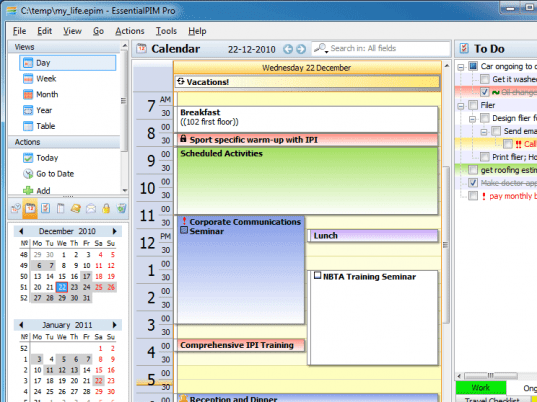
EssentialPIM Pro is a Personal Information Manager (PIM) that makes it easy to control your appointments, tasks, to-do lists, notes, and contacts. With built-in email support, EssentialPIM is an affordable replacement for Outlook. In addition, EssentialPIM offers portability, speed, an intuitive interface, and the ability to synchronize all of your information with your Windows Mobile Smartphone, Palm OS device, iPOD, MS Outlook, and Google Calendar.
EssentialPIM has all of the functionality that you would expect in a professional PIM. The Contact Manager offers fields for every business and home use, the ability to quickly add new fields, fast search and sort features, the ability to define contact groups, and a fully customizable look and feel. Multiple hierarchical To-Do Lists let you create categories, track priorities, manage due-dates and reminders, and customize your sort criteria.
The tree-like multilevel Outliner offers an unlimited number of folders and notes, with support for tables, pictures, formatted text, multiple tabs, and cross-linking with any item in EssentialPIM. The Scheduler lets you color-code your calendars, filter categories, and adjust the view and printout to meet your exact needs. EssentialPIM has versatile import and export capabilities, secure advanced encryption, sticky notes on your desktop, storing or linking of attachments, powerful backup functions, and the ability to send any item to email. The interface can be set to more than 30 languages including English, German, Italian, French, Spanish, Japanese, and Chinese.
Synchronization modules, which are usually offered as add-ons with other high-end PIMs, are included with EssentialPIM. You can sync your EssentialPIM data with your Smartphone, PocketPC, iPOD, or Palm OS device. Ensure that your Google Calendar account is always in sync with EssentialPIM's calendar. You can even synchronize all of your EssentialPIM data with all versions of Microsoft Outlook.

Editor review: Daily Reviews Team, 2005-10-13 01:10:10

    Get your personal and professional life in perfect order with the EssentialPIM Pro.
    It is easy to import and export data to and from this program. You can import your data from your existing PIM software or from Outlook/ Outlook Express. Then the data which is useful to you alone is maintained and clutter is cleared away from your system. You can retrieve any data, anytime in the form of prints, or save in HTML, RTF, CSV or TXT formats. It maintains your schedules and your to-do lists. With its customizable color management feature you could organize your tasks on the basis of priority, completion level or occurrence. You could also organize your notes and contacts in any manner you prefer. Your data is absolutely secure with the encryptions used. The interface is simple, attractive and multi-lingual.
    The software comes in two more versions – EssentialPIM Free and EssentialPIM Pro Portable.

Visit homepage of EssentialPIM Pro

Download EssentialPIM Pro 3.01


windows to ipod
ipod audio formats
print pro
notes palm
convert txt to csv
sort by color
mobile contacts
data recovery from mobile
personal info manager
advanced task scheduler

Programs related to EssentialPIM Pro

Copyright © 2001-2009, Free Downloads Center.