


Publisher's description
Distributed Printing and Archiving in one Step with your Copier
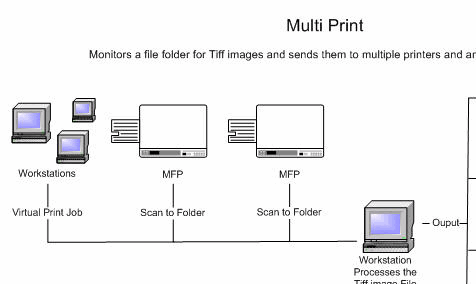
Multi Print is a distributed printing program that processes tiff images and PDFs, it is unique in it also has the ability to optionally archive the print job as a PDF. Unlike conventional distributed printing solutions where a special driver is setup and used, Multi Print watches a file folder for the arrival of a tiff image. When a Tiff image is found it is sent to specified printers and printed and then optionally saved as a PDF or in its original format.
This ability makes it ideally suited for use with a MFP (copier) when the user wants to copy a file, archive it, and deliver it to various printers all in one step. For instance it can be used to archive a signed document and have it printed elsewhere for processing.
Since Multi Print works by processes tiff images they can come from any source such as a Virtual Printer Driver. When used with a Virtual Printer Driver the user at their desktop can distribute a print job and archive any file in one step. This is done by using a Virtual Printer Driver such as Microsoft Office Document Image Writer or PDF Creator and saving the file as a tiff image in the watched folder.
Other uses for the program include distributing a large copy job to multiple printers when multiple copies are needed. The user can scan the file and have it printed on as many printers as they wish. For instance, if four copies are needed one copy can be sent to each of four printers or two copies sent to two printers.
Multi Print is a distributed printing program that processes tiff images and PDFs, it is unique in it also has the ability to optionally archive the print job as a PDF. Unlike conventional distributed printing solutions where a special driver is setup and used, Multi Print watches a file folder for the arrival of a tiff image. When a Tiff image is found it is sent to specified printers and printed and then optionally saved as a PDF or in its original format.
This ability makes it ideally suited for use with a MFP (copier) when the user wants to copy a file, archive it, and deliver it to various printers all in one step. For instance it can be used to archive a signed document and have it printed elsewhere for processing.
Since Multi Print works by processes tiff images they can come from any source such as a Virtual Printer Driver. When used with a Virtual Printer Driver the user at their desktop can distribute a print job and archive any file in one step. This is done by using a Virtual Printer Driver such as Microsoft Office Document Image Writer or PDF Creator and saving the file as a tiff image in the watched folder.
Other uses for the program include distributing a large copy job to multiple printers when multiple copies are needed. The user can scan the file and have it printed on as many printers as they wish. For instance, if four copies are needed one copy can be sent to each of four printers or two copies sent to two printers.
User comments