
Free Downloads Center
e.g. Print Censor Professional 5.20.174

Categories

Latest Reviews

Vitascene Starterkit

Vitascene Starterkit
Vitascene Starterkit is a professional tool that allows to manage and enhance the effects and transitions of images.

eCover Engineer

eCover Engineer
eCover Engineer, the professional tool that allows you to create outstanding eBook covers, CD covers, DVD covers and software box covers.

Subscribe

Print Censor Professional 5.20.174 Download

Editor's rating  
Users' rating   (4 votes) Rate it!
License Shareware / $139
Downloads 1361
Publisher UsefulSoft
File size 3954K
Date added 13-Jul-2009
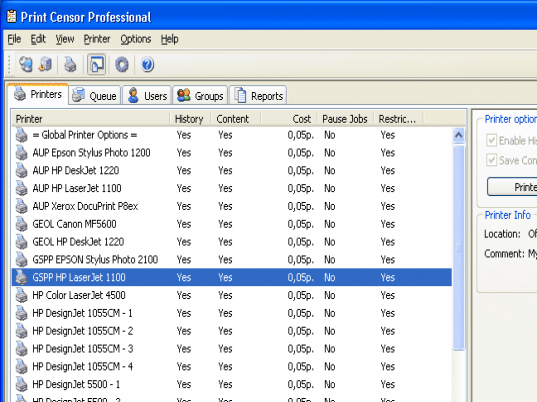
Print Censor Professional screenshot

Enlarge screenshot

Publisher's description
Editor's review
Submit your review

Control your printer use and prevent excessive printer usage. Print Censor Professional allows easily viewing, controlling and restricting printer usage on the LAN, helping you save hundreds of dollars in toners by getting rid of duplicate, restricted and unauthorized print jobs. The printer usage monitor can be controlled easily from any PC on the LAN. Set group and user restrictions on printer usage, assign and modify printing quotas, pause or stop new print jobs, etc.

Get control of your printing costs! Print Censor Professional offers highly adjustable printing cost restrictions based on media type and size, type and name of each printer on your LAN. You can put on hold or moderate new print jobs before they go through, which leads to considerable savings in case of large printing jobs and expensive cartridges and paper. Savings are easy when you control printer usage with Print Censor Professional.

Control how many jobs or sheets each user or group of users on your LAN can print. Quotas and restrictions are easy to set and to lift without leaving a chair: Print Censor Professional allows controlling printer usage from any network PC on your LAN. View who printed what, when, and on which printer with Print Censor Professional’s advanced printer usage monitor combined with a comprehensive log analyzer.

Controlling multiple printers is just as easy as managing a single one. The advanced print queue manager controls all connected workstations, and allows copying and transferring of printing jobs between the printers.

Print Censor Professional is not just a monitor controlling your printer usage. It can communicate to the users by informing them if their printing job is under review, has been allowed, rejected or finished.

Editor review: Reviewer, 2008-04-02 11:28:00

Have you been using printer in shared environment and are puzzled that why your printing cost in rising and that too when there had been not much relative productive work has been carried out? If you are experiencing such a situation, you might find the Print Censor Professional 5.1.161 worth using. It can provide you with the features to have full control over the print jobs and you can decide which job to be approved and which not. You just require having the software installed and connect to the printer. It’s easy to restrict the use of printer by any user and maintain the details that how much the resource was used. You can get the details relating to the job description and then decide to allow it or not. It supports the password protection for the printers so that the users need to enter the password and job description before conducting the work.

Print Censor Professional 5.1.161 provides you with full control over the print jobs and limit them to be more productive. Have control over the jobs by deleting or canceling the job as desired. It also helps you to calculate the printing cost to know and have control over it. The screen of the software shows the features set and helps you to select and modify them. You can get all the printers detected and added to the printer’s list. The ‘Queue’ feature helps you to have the view of the jobs and manage them as desired. Have the list of the users and get the details of the print jobs related to each user. You’re also provided with the features such as Groups and Reports. Set the printer options and have the cost set for the items include in the print work. Paper size, use of color ink, printer type, number of pages or even a document`s header can be used to calculate the cost of printing. You can use the printing cost for accounting purposes or to accept or reject printing jobs in real-time.

Print Censor Professional 5.1.161 has the capability to stop or allow the print job as per your requirements. The rating point of 4 has been set for the software so that you can have a optimal supervision over the print works carried out by your employees and also even set financial limit for it.

Visit homepage of Print Censor Professional

Download Print Censor Professional 5.20.174


printing price
job cost
printers driver
print fit
photo size print
control pro
adobe pdf printer
printing tif files
paper to pdf
shared dvd

Programs related to Print Censor Professional

Copyright © 2001-2009, Free Downloads Center.