


Editor's review
This application lets you auto send emails to appointed users/groups or email addresses when item is created, modified, or deleted; auto send reminder emails on schedule time; customize email contents with item information or other formatted text/picture.
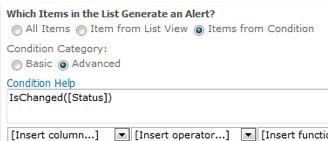
Pros: SharePoint Alert Reminder Boost contains SharePoint Alert Boost workflow and SharePoint Reminder Boost workflow, a couple of SharePoint workflow templates designed for SharePoint 2007. They run on SharePoint lists, extend default SharePoint Alert Me function and provide additional features beyond out-of-box SharePoint Alert Me features. Auto send SharePoint alert emails when list item is created, modified, or deleted. Auto send SharePoint Reminder emails for upcoming deadlines, overdue item, or change of item status. Sending targets include appointed users/groups, user/group field columns, email addresses, email columns and AD users or groups who are not in SharePoint site. Customize SharePoint email contents with item information or other formatted text/picture. Customize sending conditions using expressions including list columns, operators and functions. This package gets around some limitations in the SharePoint set up. For example sending an alert to assignees in a task list are assigned a task the process is quite round about. “Alert me” will have to be added on each task item and modify the task setting when an assignee changes. With the boost package can not only send emails to user/group but to the field columns like “created by”, modified by” and such other inner columns and other columns like “Manager”. Targets can even be AD user groups and people not on a SharePoint site. When a customer service issue is resolved you can arrange for alerts to be sent to customers on the “Customer Email” column. Original SharePoint functionality does not allow you to send reminder mails for upcoming deadlines, overdue item, or change of item status. With SharePoint Reminder Boost, these are easily done. One can send exact date/time when the alerts are to be sent through formulas created from logical and numerical parameters & operations. It supports expressions using functions, operators and columns of the list. Contents of these alerts which are canned functions of the original platform, features like STRIKETHROUGH and HIGHLIGHT helps enhance content.
Cons: Try it out in your actual job situation before deploying, the trial period lets you do that.
Overall: Rich functionality that are very useful makes this package a 4 star one.
User comments