
Free Downloads Center
e.g. TimePanic 4.0

Latest Reviews

Spryka ePostMailer

Spryka ePostMailer
Spryka ePostMailer is a highly effective and free to use mass email marketing program and bulk email sender.

Multiformat File Searcher

Multiformat File Searcher
Multiformat File Searcher, will simplify and allows you to get control over your text search job within any document.

Subscribe

TimePanic 4.0 Download

Editor's rating  
Users' rating   (6 votes) Rate it!
License Shareware / $48.00
Downloads 1766
Publisher Lionel Spohr
File size 6968KB
Date added 9-Mar-2009
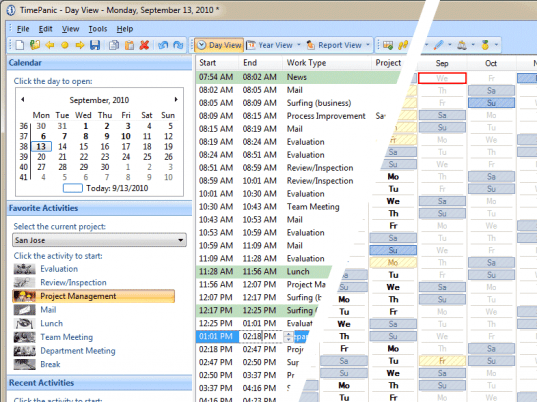
TimePanic screenshot

Enlarge screenshot

Publisher's description
Editor's review
Submit your review

TimePanic is a time tracking application for the self-employed, for small businesses, or just for anyone who works on a computer. It tracks your hours on a per project basis, distinguishes between billable and non-billable tasks, lets you enter comments, manages your absences, calculates overtime and prints reports. Unlike most other time tracking software, TimePanic is particularly good at tracking your hours in real time, as opposed to writing them down from memory at the end of the day or the week. With only two mouse clicks, you can track each relevant task switch in TimePanic at the very moment it happens. This saves you from the hassle of manual time entry, and along the way, your timesheets will become so accurate that your customers will not even think of questioning them. There are two features in TimePanic that support the two click task switch: First, the favorite activities feature lets you preconfigure your most frequently used tasks, and second, TimePanic can be set to run as a permanently visible icon in the notification area of the Windows task bar. The context menu of this icon displays the favorite activities as menu items. A number of functions in TimePanic have been realized by means of the report feature. Besides printing, they include searching and exporting data. Reports are saved in a standard document format for further processing and printing by third-party applications should the need arise. Exported time tracking data can be easily imported into Microsoft Excel. To keep you from having to re-create frequently needed reports every week or every month, favorite reports can be preconfigured in much the same way as favorite activities. For example, you can create a monthly report and set it to always use the data of the previous month. Every time a new month begins, you can reuse this report with a simple mouse click to obtain a summary of the last month. TimePanic is available in English, German and French, and also exists for Pocket PC.

Editor review: Reviewer, 2009-03-16 04:24:00

TimePanic is a time tracking application for the self-employed, for small businesses, or just for anyone who works on a computer. It tracks your hours on a per project basis, calculates overtime, manages your absences and prints reports.

Features: TimePanic is application for tracking time spent at the computer. Time panic lets you track time spent on your projects, various tasks so that you get an overall view of what`s happening on all of your projects. Time Panic is an ideal solution for time tracking for the self-employed, small businesses or anyone for that matter who works with the computer. You are able to keep track of billable as well as non-billable hours on a per project basis. You can enter comments, track absence, overtime calculations and printing of reports are also part of the features available. By keeping appropriate track you would easily be able to improve efficiency of your operations, get a clear view of priorities and thus remain on top of the projects and track the time overheads being spent on each project. TimePanic is particularly good at tracking your hours in real time, as opposed to writing them down from memory at the end of the day or the week. Enter the time used with just mouse clicks and avoid manual entry. The application can be running in the background to ease the time entry operations. Reports generated can also be exported for use in other applications if required. Similarly the time data can be taken into Excel for further analysis if required. Several language versions and a version for Pocket PC exist.

Overall: A good time tracking application with useful features and easy to use interface.

Visit homepage of TimePanic

Download TimePanic 4.0


self employed
tracking people
work order tracking
problem tracking
tracking ip address
people working
job tracking
palm time tracking
task tracking
phone works

Programs related to TimePanic

Copyright © 2001-2009, Free Downloads Center.