
Free Downloads Center
e.g. A-PDF Scan Optimizer 1.0.0

Categories

Latest Reviews

Vitascene Starterkit

Vitascene Starterkit
Vitascene Starterkit is a professional tool that allows to manage and enhance the effects and transitions of images.

eCover Engineer

eCover Engineer
eCover Engineer, the professional tool that allows you to create outstanding eBook covers, CD covers, DVD covers and software box covers.

Subscribe

A-PDF Scan Optimizer 1.0.0 Download

Editor's rating  
Users' rating   (1 votes) Rate it!
License Shareware / $39
Downloads 197
Publisher A-PDF.com
File size 2309K
Date added 25-Sep-2009
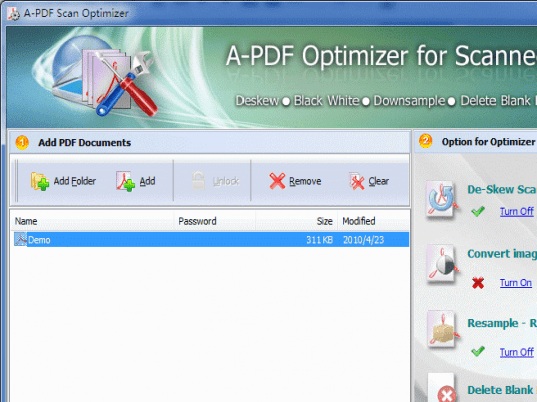
A-PDF Scan Optimizer screenshot

Enlarge screenshot

Publisher's description
Editor's review
Submit your review

A-PDF Scan Optimizer provides a quick way to batch optimize your scanned PDF documents, A-PDF Scan Optimizer can correct the skew scanned image within PDF; convert the scanned image to Black/White or gray in Acrobat PDF; downsample the image in PDF and delete unused blank page in PDF directly.

A-PDF Scan Optimizer's features include processing a batch of PDF file, even working with password protected files; filtering small images which may be a logo or else; reduce PDF file size; and dealing out some page only to speed the processing, from your PDF files, it makes the most compact, fast web view PDF files on the fly.

A-PDF Scan Optimizer does NOT require Adobe Acrobat, and produces documents compatible with Adobe Acrobat Reader Version 5 and above.

Editor review: Reviewer, 2009-11-10 13:25:00

We usually save scanned file in PDF file format to store and share. In scanned PDF file, you will find defects like skew, speckle, scaling etc. With A-PDF Scan Optimizer, you can correct the defects scanning defects and convert image to monochrome, resample the page and delete unused blank page. It is a batch utility to correct PDF images without Adobe Acrobat.

Features: Application has a very nice user interface. It is a simple and user friendly application. You need to follow simple steps to correct your scanned PDF file.

In the first step, add scanned PDF files which you would like to correct in the list, you can add files by adding folder as well. In the second step set options for optimizer, it has options like De-skew scanned image, Convert images to monochrome, resample and delete blank page. With de-skew option you can specify angle working range in degrees, angle range from 1 to 90, low angle values enhance performance and accuracy. With convert image(s) to monochrome option select PDF source file which you want to convert, select dithering options as threshold, ordered, grayscale, set threshold parameters etc. Application allows you to resample image with three types By DPI, By Scale and by width and height. You can specify value for type. You can also choose resample filter from the list of available options. Application allows you to adjust testing parameters to recognize the blank page to delete it. With General option you can set image width and height, apply page range, set compress quality and define backup file option while optimization. Once all the settings are done click on button “optimize” or “optimize and save as” corrected images will be saves at the defined location.

Overall: It is a nice utility to correct your scanned PDF file.

Visit homepage of A-PDF Scan Optimizer

Download A-PDF Scan Optimizer 1.0.0


pdf image convert
adobe pdf convert
convert images to pdf
batch pdf convert
convert adobe
convert ai file to pdf
convert any file to pdf
convert file to pdf
convert files to pdf
convert pdf files

Programs related to A-PDF Scan Optimizer

Copyright © 2001-2009, Free Downloads Center.