


Editor's review
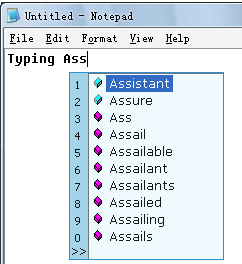
Typing Assistant Auto-Completes your frequently used words and phrases anywhere. It makes typing faster, more intelligent and lowers effort.
Pros: Typing Assistant is able to type ahead and complete the words, parts of which have been entered. Frequently used words and phrases thus can be typed in with the least effort Auto- More standardized a document, standardized in the sense of using frequently used words/phrases, more productive you get. The application provides a set of suggestions in a smart window based on the characters already typed in. You can then simply click on the right choice or use a keystroke. The smart window is really a floating window which appears net to the cursor location at which you are typing. The application keeps learning words you use. It can expand user defined shorthand or abbreviation. It has access to the clipboard historical content so that it can complete words/phrases based on these too. Once again you can get a smart window appear with the recent clipboard text strings in them and you just have to select the one you want. Additionally it can launch user defined applications. That makes it quite a smart application which gets smarter as it gets smarter as you use it more and more.
Real time spell checking is quite a help, misspelled words causes beeps While this can be useful for anyone using keyboard in a computer, it is particularly useful for those who create documents more often. Authors, secretaries, journalists, translators, document creators and programmers are just some of the types. It works with most Windows programs and easy to configure. It can be made completely portable and run from a USB device. There are German, Italian, Hungarian, and Portuguese besides the English version.
Cons: It can be quite distracting, even irritating when the smart window keeps appearing on the document you are creating. The suggestion list can get to be quite big and hence defeat the productivity gains.
Overall: This is good and certainly deserves a 4 star rating.
User comments