


Editor's review
FileInMail 2.0 has been tailored for automatic monitoring individual or multiple directories for specific files. The program supports archiving the files on disk immediately as they appear, and later forwards them through email from one recipient to others in a way similar as you send email manually, for which it utilizes your email client application. It’s compatible to work with MS Outlook, Windows Mail, Outlook Express, Mozilla Thunderbird, or any other MAPI client, and sends the email unattendently or with user intervention. The program also allows you to specify several custom email Body and Subject text for every type of email. It easily can be run on Windows ME, 98, 2000, 2003, XP, 2008, and Vista.
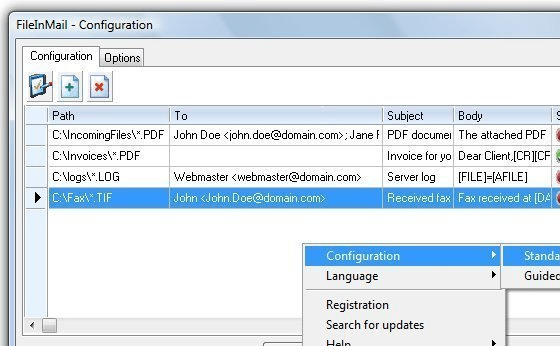
To get started with FileInMail you can first time use it with the default configurations set with basic parameters required for monitoring the files to automatically forward them through email. The configurations get applied automatically, but you can also start them manually through right-click over the program tray icon, and choose configuration to be guided for default, and standard for customizing it yourself. Now you can select the monitoring folder, within which the necessary files has to be selected. Specifying the files, the program captures them itself, and generates a new email with the selected file already attached in it. While you customize the configurations¸ it lets you set monitory directory path; recipients’ addresses; subject line of email; email body text; timer for program to check the file to be send; archive directory for specific files; days for deleting files from archive; email client program; and other supportive features. After setting these, the program performs competently to email file to single or several recipients from the selected email client as per your preferences.
With the FileInMail 2.0, you can easily specify a monitoring folder to send specific files automatically through email. The utility includes a distinctive set of features that provide you with impressive and prompt results, thus making it deserve 3.5 rating points.
User comments