
Free Downloads Center
e.g. Rapid Email Sender 10.30

Latest Reviews

Vitascene Starterkit

Vitascene Starterkit
Vitascene Starterkit is a professional tool that allows to manage and enhance the effects and transitions of images.

eCover Engineer

eCover Engineer
eCover Engineer, the professional tool that allows you to create outstanding eBook covers, CD covers, DVD covers and software box covers.

Subscribe

Rapid Email Sender 10.30 Download

Editor's rating  
Users' rating   (1 votes) Rate it!
License Shareware / $50.00
Downloads 409
Publisher Valid Email Collector
File size 2034K
Date added 28-Mar-2009
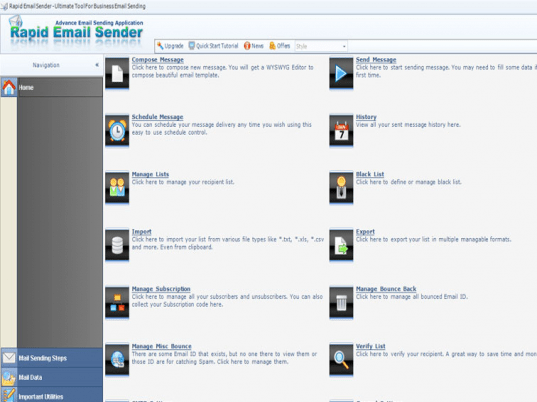
Rapid Email Sender screenshot

Enlarge screenshot

Publisher's description
Editor's review
Submit your review

Rapid Email Sender is an intelligent software that can send personalized newsletter to any number of recipient. It is very easy to use. For sending flyers, brochures, newsletter and others this is a perfect tool. Rapid Email Sender makes email marketing too easy for companies and individuals. It is a perfect tool for bulk mail sending without any hastle. Mail Merge function, Multiple SMTP, Direct Sending and oters unique features makes it #1 in current email market. There are tons of functions available to complete a successfull email marketing campaign. It can send mail:

* Directly. Just select this option in the SMTP window to send mail directly without specifying any SMTP server and Rapid Email Sender will do the rest for you.
* Using third party SMTP Server. Specify any SMTP server along with any port number (25 or 587 or 465) and send mail. Rapid Email Sender supports any SMTP server along with free mail provider (Yahoo, Gmail, Icmail, e.t.c).

This software is also able to track your sent mail. Through tracking you will get who opened your mail, from which machine your recipient opened the mail and others.

# It is guranteed that your mail will reach to recipient's inbox as Rapid Email Sender can create Spam filter compliant email content.
# Rapid Email Sender 10.30 includes a built in WYSWYG editor that will allow you to design eye catching email content that is also Spam filter compliant.
# Customizable Mail Merge function allows you to send dynamic message to each separate recipient.
# Multiple SMTP server ensure 100% message delivery. If there is any SMTP failure occurs then Rapid Email Sender will automatically shifts to another SMTP.
# This software can import from text file, Excel file and custom .aomr file.
# Block sending function has been added for BCC sending.
# Rapid Email Sender can send mail directly. It bypasses your ISP's mail server. It also works if port number 25 is blocked.

Editor review: Reviewer, 2009-11-03 13:32:00

Almost all business needs to communicate with their large subscriber, customer, vendors or business partner base for product update, important communication about policy changes or any other mass communication needs. Rapid Email Sender helps you send personalized bulk emails.

Features: The application has a nice user interface. Look and feel is similar to Microsoft word. Anyone can easily work with this utility. The application allows you to perform SMTP setting to send and receive emails. Enter all required information like SMTP server name, port, select authentication type from the available drop down list, enter username and password, Enter POP3 server name and port, select send mail option as use external SMTP or Directly. You can save this SMTP setting for future use. You can load setting from a file or load Gmail settings.

The application allows you to set mailer setting like specify timeout in ms, email address for tracking notification, set priority, for unknown recipient name use Sir/Madam, wait after sending a mail for specified ms. Set DNS settings, you can set header of all mail. The application has built-in editor to prepare you message. Using this editor you can prepare nice email messages as you can insert image, table, format your text etc. You can also import email message from ASP, HTMP pages. Mail merge feature helps you to personalize your email; you can use existing function or add a new function as per your requirement. Once all the settings are done and message is ready to send, click on send button, a new window will appear to select email address for bulk mailing. Either you can add new email address or import from text file or CSV file. Once you select email addresses of your recipients then click on send button to start sending emails.

Overall: It is a nice software to send personalized bulk emails.

Visit homepage of Rapid Email Sender

Download Rapid Email Sender 10.30


bulk email sender
email sender
sender email
sender mail
multiple mail sender
non bulk mail sender
email bulk sender
machine design
spam filter for server
email merge

Programs related to Rapid Email Sender

Copyright © 2001-2009, Free Downloads Center.