


Editor's review
You require scanning official paper documents and sending them to your partners, team members, staff, client, customer, etc through email a lot. But, from scanning the document, storing it as an image file, then attaching it to your email, the entire process kills much of your time. If you’re tired of wasting so much time in this monotonous process, and are willing to take up an easier way of performing it, then you must give a trial to Scan & Attach for Outlook 1.1. It’s an effective add-in tool for Outlook email client that saves your time by scanning and attaching your document with email, automatically. Pressing the program button, it automatically would scan your document as TIFF, PNG, JPEG, or BMP image file, and further attach it to your email. In addition, it also offers full-fledged image editor for altering scanned images which is accessible with ‘Scan & Preview’ option.
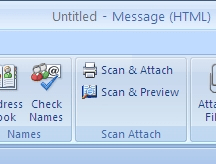
Scan & Attach for Outlook tool integrates a ‘Scan’ section with Outlook toolbar, containing Scan & Attach, and Scan & Preview options. While using the tool when you create an email, you simply have to click over ‘Scan & Attach’ option. It makes the utility use the scanner for scanning the placed document and place the converted image file as an attachment with your Outlook email. Further, before attaching to the email if you wish to make changes to the scanned images, you can choose ‘Scan & Preview’ button for editing them with adjust, flip, crop, or reorder features. In addition, you can scan and attach multiple pages, view images, choose desired output format, and set resolution for the scanned images. Moreover, you’re also allowed changing the tools appearance by selecting the desired skin to suit your Outlook 2007 interface theme.
Using the Scan & Attach for Outlook utility makes it easier for you to scan your documents, alter them, and attach the resulting image to email without leaving your Outlook client. For its expertise functioning and the impressive features you can rely upon, the utility justifiably deserves 4 rating points.
User comments