


Editor's review
Are your kids spending their huge amount of time while gaming on their PCs, instead of studying? Well, in order to avoid such time-wastage, you can become cruel enough either to uninstall the games, or forcefully limit their access to computer. However, both these activities would allow your kids to play games in your absence. Thus a plausible solution for the purpose is to employ a secure password to the games. It would help you scheduling their time as you can enter the password and let them play or ask them to study, as required. In order to apply password protection to the required games, you can try out the new Game Protector 1.0. It facilitates you with easy-to-use features that help you apply desired password to any of the game application.
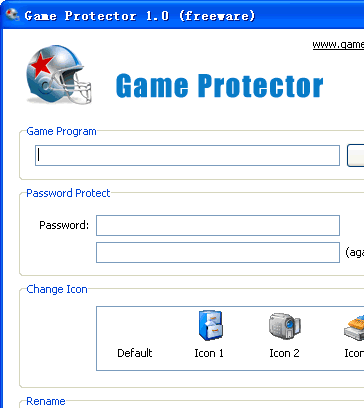
Game Protector 1.0 opens with decent GUI consisting options placed on the screen. For protecting the game application you need to begin with its selection by browsing and opening the game file with the program. Next, you have to enter the password and re-enter it, and with the ‘Change Icon’ option you can even change the icon of the game, selecting any from the given broad icon range. Even to hide its identity further, the program also allows you to ‘Rename’ the game. Now press ‘Protect’ and the password protection would be applied to the selected game. Moreover, you can also ‘UnProtect’ the gamer whenever you want. Along with this, you can command the program to create backup of the game file by enabling the ‘Create Backup’ option. Even, not only the games application specifically, but you can also try out the password protection on other applications. Applying the protection, whenever you would launch the game, you would be prompted to enter the correct password.
Game Protector 1.0 provides easy to apply effective protection for your game and for different other applications. In consideration to the easily negotiable options and adept performance in applying the password protection, the application deserves to be rated with 3.5 points.
User comments