
Free Downloads Center
e.g. SuperCool Calendar 1.00

Latest Reviews

AlphaEZCam

AlphaEZCam
AlphaEZCam is a fully functional webcam application that has the capability to manage multiple cameras and upload images to web servers.

AirGrab WiFi Radar

AirGrab WiFi Radar
AirGrab WiFi Radar is a highly efficient tool for displaying and providing you access to the Apple Airport base stations and other WiFi wireless access points.

Subscribe

SuperCool Calendar 1.00 Download

Editor's rating  
Users' rating   (4 votes) Rate it!
License Shareware / $29.5
Downloads 6334
Publisher cw
File size 900K
Date added 23-May-2004
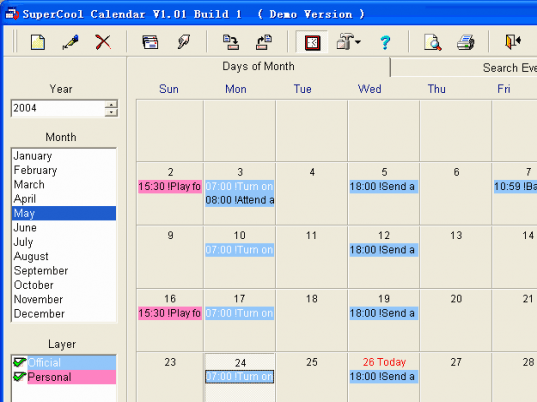
SuperCool Calendar screenshot

Enlarge screenshot

Publisher's description
Editor's review
Users' reviews (1)
Submit your review

SuperCool Calendar - PIM software about calendar with alarm and reminder. Ever felt that you have problems managing your time? With SuperCool Calendar on your Windows desk this will never be a problem again. No more missed meetings or birthdays, no more unnecessary stress because of bad planning. Get more freedom and feel more relaxed by simply knowing when to do things. Don't let time control you - you control time. Feature:
1. Alarm: Define any number of hard-to-remember event and SuperCool Calendar will alarm you when the time arrives. All kind of things can be scheduled, like birthdays, anniversaries, meetings, dates, TV programs, etc. One-time and recurring events may be arranged with ease, and the rescheduling frequency can be defined by days, weeks, months or years. Events can be also repeated on a particular day of week in a given month or in every month.
2. Limitless layers: You can have limitless layers with different color that each represent a calendar with independent settings. In this way you can have different layers for different types of events and you can control layers you want visible at any one moment.
3. Powerful search: The events can easy be found in many ways, such as period defined, whether archive or not, text included in subject, content or note, and etc.
4. Backup and restore: You can backup all the events and setting to a zip file, and restore it when your PC crashs. You can also share the calendar with friends and other people.
5. Tray icon: SuperCool Calendar puts, if you want, an icon in the system tray. This is good if you want the program to always be running, which is necessary if you are using alarms.

Editor review: Daily Reviews Team, 2004-05-24 01:10:10

    SuperCool Calendar is an innovative scheduling tool which solves all your time maintenance problems.
    The tool has alarms and reminders making it impossible for you to forget your appointments, birthdays, anniversaries and events coming up. You can set the alarm for this tool to remind you of a single event or of recurring events. This recurring events’ frequency can be set by days, weeks or years. You can set limitless layers of different events displayed in different colors. You can choose which layer you would like to view. There are powerful search options to search for a particular event. The other advantage is that you can backup and zip the files for use when the system crashes. Set a tray icon to be reminded of events by letting the program running continuously.
    You will never have a problem managing your time and remembering the important events in your life.

Visit homepage of SuperCool Calendar

Download SuperCool Calendar 1.00


desktop calendar alarm
planning calendar
layers in html
microsoft calendar control
calendar week number
restore icon
calendar and time
calendar and reminder
calendar event
window layers

Programs related to SuperCool Calendar

Copyright © 2001-2009, Free Downloads Center.