
Free Downloads Center
e.g. DateInTray 1.5

Latest Reviews

Spryka ePostMailer

Spryka ePostMailer
Spryka ePostMailer is a highly effective and free to use mass email marketing program and bulk email sender.

Multiformat File Searcher

Multiformat File Searcher
Multiformat File Searcher, will simplify and allows you to get control over your text search job within any document.

Subscribe

DateInTray 1.5 Download

Editor's rating  
Users' rating   (6 votes) Rate it!
License Freeware / $0
Downloads 2939
Publisher CrispyBytes Development
File size 112K
Date added 8-Jun-2006
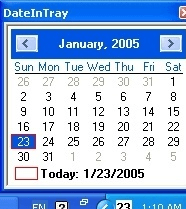
DateInTray screenshot

Enlarge screenshot

Publisher's description
Editor's review
Submit your review

DateInTray is a small freeware utility that displays the date in the Windows tray. The day of the month is displayed in the DateInTray icon, and the entire date can be seen in a tooltip popup by holding the mouse cursor over the icon. A useful popup calendar can be brought up by clicking on the DateInTray icon. This easily accessable calendar popup is very useful when you need to quickly reference a calendar. The calendar popup automatically shows the current date, and include arrow buttons to easily view next and previous months. DateInTray can be easily added to the Startup folder in the programs menu so that it automatically starts every time you log in.

Editor review: Daily Reviews Team, 2006-06-10 01:10:10

    Add yet another feature to your system tray, get the display of the current date with DateInTray.
    As the name suggests this simple and free to use tool will display the current date on your system taskbar. Moreover the whole date can be accessed as a tooltip popup whenever you place the mouse cursor on the icon. One can easily access a handy calendar instantly simply by clicking on the icon. This elite calendar is supported with arrow buttons that allow you to view next and the previous months. This is a customizable tool with a variety of options that allow you to change the display characters of date. With a simple interface the tool can be accessed by right clicking on the icon that displays a pop-up menu comprising the; show calendar, about, exit and help features. This useful tool can be added to your start-up folder of your programs menu so that it is automatically launched each and every time you are logging in.
    DateInTray supports simple installation and un-installation interface.

Visit homepage of DateInTray

Download DateInTray 1.5


windows xp up date
quick month calendar
small icon
time calendar
tray popup
site calendar
pocket pc calendar
calendar component
calendar share
cursor icon

Programs related to DateInTray

Copyright © 2001-2009, Free Downloads Center.