

Free Downloads Center
e.g. NoteZilla 7.0

Latest Reviews

Vitascene Starterkit

Vitascene Starterkit
Vitascene Starterkit is a professional tool that allows to manage and enhance the effects and transitions of images.

eCover Engineer

eCover Engineer
eCover Engineer, the professional tool that allows you to create outstanding eBook covers, CD covers, DVD covers and software box covers.

Subscribe

NoteZilla 7.0 Download

Editor's rating  
Users' rating   (5 votes) Rate it!
License Shareware / $29.95
Downloads 8141
Publisher Conceptworld Corporation
File size 3967K
Date added 17-Apr-2007
NoteZilla screenshot

Enlarge screenshot

Publisher's description
Editor's review
Users' reviews (1)
Submit your review

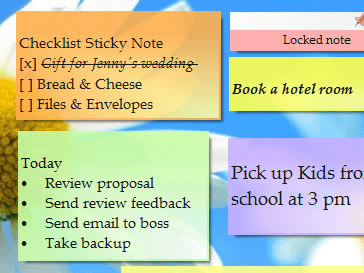
Take quick notes, tasks or appointments on attractive sticky notes on your Windows Desktop. These sticky notes look like 3M Post-It(r) Notes. Stick them to websites, documents, programs or any other window.

If the desktop gets too messy, you can neatly arrange them into virtual memoboards (folders). Finding a note back is extremely fast. Send these stickies to your coworker over network or as email (if coworker offline). Tag each note based on contexts, topics or projects.

The new "Notes Browser" lets you to categorize, arrange and view notes very conveniently. Password protect notes to keep secured information in them. Other features include support for notes skins, color, transparency, advanced text formatting, spell checker, find-as-you-type, hotkeys, attach files, note priority, stay on top, drag and drop notes.

NoteZilla lets you to synchronize notes with your favorite PDA Handheld or Mobile Device via Microsoft Outlook. You can also synchronize directly with a Palm OS device.

Editor review: Reviewer, 2007-08-20 08:06:00

The software is quite interesting and reminds you of all the works that essentially needs to be care off. The notes made are displayed at the chosen place everywhere you work. The best part is that it does not obstruct your work and the options can be used anytime.

There are two utilities NoteZilla Notes Browser and NoteZilla, the later one stays in your system tray. The icon in the system tray has options intact with both left and right clicks. From left click options you can make new notes, find notes, hide and show all notes. The notes browser can be opened and the favorite memoboards can be selected as business, desktop, etc. You can place the note on the top. The right click has more options including some of left click options. The color and skin of the note and the priority to be high or normal can be selected. Tags can be set to the notes. By using desktop options the layout can selected to be tiles, cascade, etc. Notes can be sorted by color, by date or order and so on. You can roll up or down the notes and make it fit to the content. The notes formed also have some options. Including same other options you can edit the title, set a reminder and select the transparency. Even files or folder can be attached that can be opened by clicking on the attachment sign. The notes can be stick to windows and made secure by locking them with the password. The notes browser lets you search the notes, made and send to trash. It contains all the options with a filter option that categorizes the notes according to features like reminders, recently modified, etc.

It’s having help option that gives the details for operating the program. The software is good and interesting and the notes give a fun feeling while making them.

Visit homepage of NoteZilla

Download NoteZilla 7.0


quick notes
post its desktop
stick on note
notes network
windows desktop post its
pda desktop
edit stick
palm notes
neat notes
end notes

Programs related to NoteZilla

Copyright © 2001-2009, Free Downloads Center.