


Editor's review
Remember making note slips and sticking it to table or board. NoteScraps would ease your work and you won’t need to find any piece of paper or pen. You can make the notes easily and won’t need to stain your desk corners with glue.
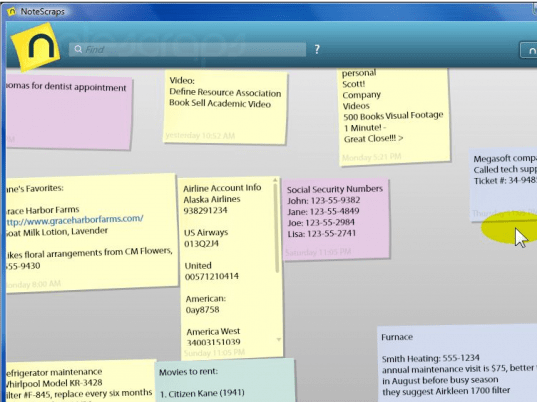
The software is less time taking in downloading and installs in fewer clicks. The software has a very pleasant and nice look. The software do not contains many options. There is a yellow icon on the left screen and also there’s an option on the top right for making a new note. The working is simple and easy even any one can make the notes without any difficulty. You just need to click the icon or the option and a new empty note appears. Click on the note, enter the text and click anywhere on the empty screen, the work is done. You can change the color of the note according to your choice just by right clicking on it. You can make many notes that are displayed on the middle screen. The note can be easily edited just by clicking on it. The clicked note would expand in front and you can do the editing. The lower part of the screen shows the day and time when the note was made. If you want to delete a certain note you simply need to select the note and delete the text. Click anywhere on the screen the note gets deleted itself. If you want to search any particular note you just have to enter the related text in the bar above. The text matching note would come in font and all the others disappear.
The NoteScraps software doesn’t have the help guide to give information about the function of the program. But the program is so simple that no help is required to operate it.
User comments