


Editor's review
Do you find it hard to maintain your “to do” list manually, managing your tasks relating to important projects, setting the reminders, and other such things? If it is so, then make your work easier with the help of Quick To-Do Pro 4.5.1. It provides you with different features to organize the To-Do List and even supports specific customizations. In addition it also enables you to attach files, URL or program to be run. Manage the list of the assigned tasks to others and keep the proper track of the projects that had been going on. Set the alarms, use dairy, set reminders for birthdays, anniversaries, meetings, etc and also receive information according to day, week, month or year. It stays at your system tray and does not interrupt until it has to remind you of something important.
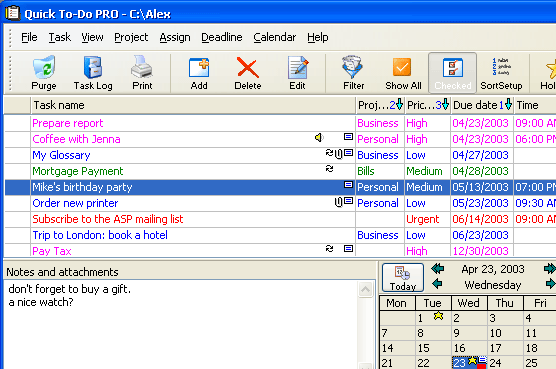
Quick To-Do Pro 4.5.1 has the clean interface with the options all set on the screen. The tasks that had been set are shown listed so that you easily get the details regarding any of them. Clicking on the task you would be shown the added note or attachments if any. Even it’s easy to set the priority level for the task to be low or high importance. On the bottom right area you get the calendar to check out for present and future engagements. It also can be changed to mini view of the main window. The program stays working at your system tray from where you can get the compact view of the details relating to the present day. For entering the task you need to enter the details like name, due date, alarm time, priority, attach file. Setup the list of the special days and maintain them with time. Apply the filters by setting the provided options and it’s also easy to get the reports relating to the task printed for your convenience of carrying. You can easily set the options of the program as required by you.
Quick To-Do Pro 4.5.1 is capable of performing the function of organizing and managing the tasks, reminders, etc with aplomb which earns it an appreciable score of 4 rating points. Its wide usability and easy to use features also adds volumes to its repute.
User comments