
Free Downloads Center
e.g. Advanced Duplicates Finder 1.6

Latest Reviews

Spryka ePostMailer

Spryka ePostMailer
Spryka ePostMailer is a highly effective and free to use mass email marketing program and bulk email sender.

Multiformat File Searcher

Multiformat File Searcher
Multiformat File Searcher, will simplify and allows you to get control over your text search job within any document.

Subscribe

Advanced Duplicates Finder 1.6 Download

Editor's rating  
Users' rating   (1 votes) Rate it!
License Shareware / $32.90
Downloads 490
Publisher My Music Tools
File size 1291K
Date added 11-Apr-2008
Advanced Duplicates Finder screenshot

Enlarge screenshot

Publisher's description
Editor's review
Submit your review

Modern hard drives can easily hold up to tens and hundreds of thousands files. As we don't really need to save disk space these days, we often toss files around, create backups, make multiple copies of folders and then completely forget about them. However, this can hardly be called a rational way of storing data, let alone the fact that it creates a mess in your computer. When you think that the time has come to clean up and eradicate the obvious file redundancy, you suddenly realize that it will take you days to manually compare and delete duplicate files. If this is exactly the problem you are facing or will face in the nearest future, relax, as you are not in much of a trouble. Advanced Duplicates Finder will do the trick.

Advanced Duplicates Finder possesses a simple wizard-driven interface which guides you through the process. This compact application was specifically designed to automate the process of searching, identifying and deleting duplicate and void files scatted across your hard drive or any other media. Which is more, this software finds MP3 files with similar ID3 tags, similar images and files with similar names and size. In practice, it allows you save disk space by removing multiple instances of the same song or delete sets of test shots that your camera made in the burst mode. Not only does Duplicates Finder allow you to remove such files, but it also gives you an opportunity to move them to an isolated folder and then restore retaining the original location. It comes really handy when you just want to get rid of the mess, but doubt the necessity to actually delete the files. Yet another option is to find duplicate files and then save their paths to a text file. This will help you do the cleanup in the future, but not waste time on searching for the files again. Finally, the application is capable of searching ZIP archives as well.

That said, are you still having doubts that the handy tool is something your software set can stay without?

Editor review: Reviewer, 2008-04-22 08:40:00

As you keep working on our computers we start to get loads of files collected on it with many of them being duplicates of each other. While working with so many duplicate files that get stored at your PC it becomes a Herculean effort to find them all manually. But now you can ease your work with the help of Advanced Duplicates Finder 1.6. It provides you with wizard style interface that requires you to a simple follow step by step process. The software searches, identifies and deletes the void and duplicate files from the hard drive or nearly any other media. It also finds the MP3 files that contain similar tags and images or those that carry similar size and names.

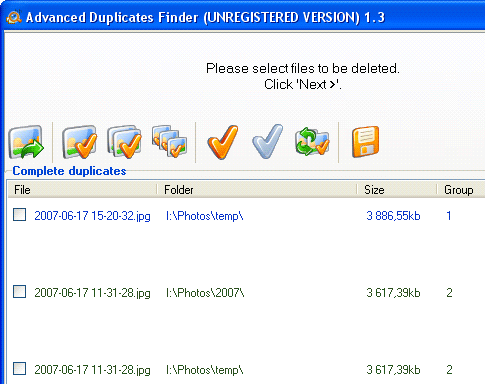
Advanced Duplicates Finder 1.6 on launch displays a set of easy features that can be operated even by a novice. The wizard interface requires you to first select ‘Find duplicate files’, ‘Open the list of duplicates from a file’ and ‘Restore files moved to a separate folder earlier’. Set the criteria to carry out search for the duplicate files. Enable searching the complete duplicates, similar images, MP3/OGG/WMA files with similar tags, etc. Set the filter features like Mask, Size, Date and Attributes. You can even have the filters disabled if required. Move on to the ‘Next’ step and the program shows the folder and drives on your PC that you can mark to select them for searching the duplicate files. You can also enable searching ZIP and ZAR files. Click ‘Next’ and the programs start the process for searching the duplicate files. When the program is finished with the search then the duplicates files are shown listed on the screen. Mark the files the duplicate files found by surfing through them. The selected files can be Deleted, Moved to recycle bin and moved to a new folder or even copied.

Advanced Duplicates Finder 1.6 finds the duplicate files and does the search to the best possible extent according to the features chosen by you. You can even change the settings according to your convenience and all these innovative features and effective functioning earns it a score of 4 rating points.

Visit homepage of Advanced Duplicates Finder

Download Advanced Duplicates Finder 1.6


disk space finder
duplicate mp3 file finder
code finder
duplicate file cleanup
network finder
find mp3 duplicates
delete id3
rar video files
save streaming media
compact media player

Programs related to Advanced Duplicates Finder

Copyright © 2001-2009, Free Downloads Center.