


Editor's review
Often when a customer buys any product, the foremost thing that catches his eyeballs is the product’s packing. If the packing of the product is made attractive, it would persuade the customers to buy the product. Thus, while designing the graphics for the product’s cover box, every designer puts his best efforts to make it more captivating. If you also want to design your product’s covering that makes it more tempting, then you can take the assistance of 3D Real Boxshot 4.0. The software is easy to use and helps you in creating 3D boxes for your products like softwares, CD, DVD, Poker, etc. To form the box, just select the type of box required, and set the images that you want to be placed on the covers.
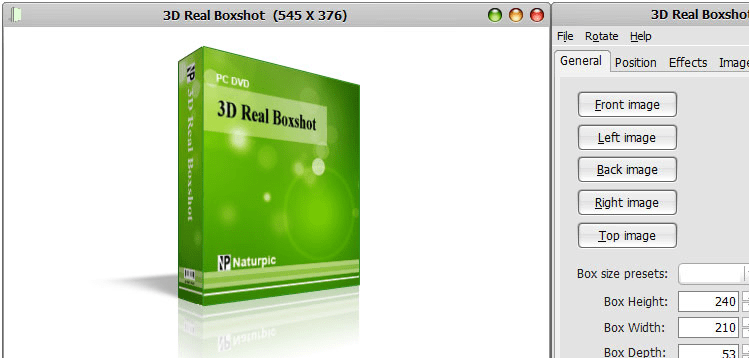
3D Real Boxshot 4.0 provides an extremely simple user interface and convenient features that makes it a delight to use. The interface of the application somewhat resembles the image viewer window. A dialog box placed on the screen shows the customization features that you can use to make the modifications. The graphic for the box is shown at the middle of the screen. To start the box formation, firstly you’re required to select the Box size preset to be Software, DVD, CD/VCD, 3.5" Disk and Poker. To make further changes to box size you can easily set the Box height, width and depth. Coming to the cover graphics of the box, you can select different images for all the sides of the box. Select desired images for the front, left, back, right and top side of the box. The ‘Position’ option helps you to set the ‘Distance’, ‘Rotation’ and ‘Camera Position’ to change the box view. To give the graphics a realistic feel you can apply Shadow and Reflection effects. Modify the size of the image that you placed on the sides of the box, if required. Finally play the graphic to view its appearance from all the sides and save it with the desired format.
3D Real Boxshot 4.0 supports creating, rotating and zoom the graphics on box-covering, to help the users to create attractive boxes. The application is capable of importing the images with different formats, such as- GIF, JPG, TGA, TIF, WMF, WBMP, etc. For its easy to use customization features, and for its trouble-free box creation process, it has been rated with 3 rating points on the scale of 5.
User comments