

Free Downloads Center
e.g. Alamoon Image Enhancer 1.7

Top in this section

JAlbum

Free popular web photo album generator. Drop folders containing image and movie files onto JAlbum. JAlbum will create thumbnails of your images and display them in index pages in HTML.

Latest Reviews

Animated Wallpaper Maker

Animated Wallpaper Maker
Add life to your desktop, decorate it with self created animation wallpapers with the help of Animated Wallpaper Maker.

Pimero Free Edition

Pimero Free Edition
Pimero Free Edition, perfect for private use this program will manage and organize all your personal information, appointments, emails, contacts, tasks and notes.

Subscribe

Alamoon Image Enhancer 1.7 Download

Editor's rating  
Users' rating   (1 votes) Rate it!
License Freeware / $0.00
Downloads 2837
Publisher Alamoon.Com
File size 2006K
Date added 11-Nov-2009
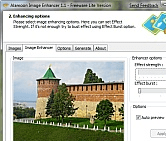
Alamoon Image Enhancer screenshot

Enlarge screenshot

Publisher's description
Editor's review
Submit your review

Alamoon Image Enhancer automatically enhances and improves color in your images. You don't need to know a thing about computers or photography to get great looking digital photos every time. Alamoon Image Enhancer is a fully-automatic, hands free, one-click photo enhancer.

You want to have great looking photos and get the job done with ease and fun? You don't have to do a thing - you'll never need to read a manual, never need to open software and never even need to hit a button to make all your pictures look amazing.

Editor review: Reviewer, 2009-05-28 11:04:00

Alamoon Image Enhancer automatically enhances and improves colors in your digital photos. It is a fully-automatic, easy to use, one-click color enhancer.

Features: Alamoon Image Enhancer automatically enhances digital images. Alamoon Image Enhancer is a fully-automatic, hands free, one-click photo enhancer. You need not know a thing about computers or photography to get great looking digital photos every time. The interface is simple and is tabbed. The tabs available are images, image enhancer, options, generate and about. The image tab is essentially the list creator for the images that you want to enhance in a batch operation. The display area lists the file names, file types and file sizes of the images chosen. You can add files or folders. The controls to add file/folder and removing them are available. There`s a thumbnail preview also available on this page.

On the image enhancer tab you can see the full image. You can select the strength of the effect and a burst mode. The slider controls decide the strength of the effect being applied. Options tab lets you set the output file name. You can get the images converted at this stage. Simply choose the format of the output file. You can resize the images too. Keep the proportionality and change height or the width or alternately change both without maintaining the proportionality. On the generate page you get the actual processing done. Progress bars show the enhancement progress. Progress bars for the full batch and current images are shown. The log area shows the progress as each image is completed, it is listed.

Overall: What exact effect is used is not clear, not documented. It is not clear what the burst effect is either.

Visit homepage of Alamoon Image Enhancer

Download Alamoon Image Enhancer 1.7


photo fun
photo digital
digital photo plus
photo color
time to photo
photo pictures
make 3d photos
digital photo
image photo
photo and pictures

Programs related to Alamoon Image Enhancer

Copyright © 2001-2009, Free Downloads Center.