


Editor's review
Aoao Batch Rename is a easy and comprehensive piece of software that enables you rename multiple files at once.
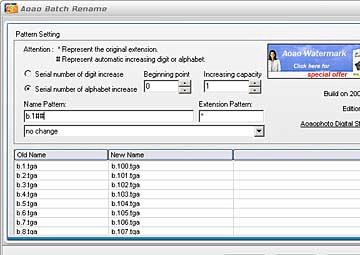
Pros: Aoao Batch Rename is a simple application that helps rename a batch of images to suit your convenience. You can specify and rename a number of files at a time. The interface is easy and comprehensive. Add button below the main display list lets you add image file names that need to be renamed. Clear helps remove a file from the list. Once a final list is ready you click on the Run button to get the process started. If the image files are to be renamed individually, you can specify the names in the new names column. However there are couple of steps prior to this if you need auto renaming. It is possible to do auto renaming where starting with a number or a alphabet auto incrementing is done by the application and the name assigned to the next file as the output file name. The extent of auto incrementing can be specified. Starting with 1, in case of numbers, the increment can be as large as you need. The starting point also can be specified to be any number. The pattern of the name and the extension can be specified. There are other adjustments possible for the output file name. These include change to capitals, change to lowercase, change extension to capitals, change extension to lowercase, change both name and extension to capital and change both name and extension to lowercase. It can help you naming picture using prefixes, suffixes, date time, and serial number etc.
Cons: Functionality seems too narrow for an independent application. It would be a nice extension of features in an application for other image functionality.
Overall: The application does have the features required for the narrow functionality the application is positioned at. This is a 3 star package easily.
User comments