
 |
 |
|
|
 |
 |
 |
 |
|
|
Batch Picture Protector is a powerful and easy-to-use batch photo watermarking software. Program protects your digital photos and artworks by adding professional transparent stamps that combine text, images and graphics. When used in conjunction with your favorite photo editing software, a watermark can even contain website url,your copyright, or logo image. Batch Picture Protector is the best way to achieve faster and simpler picture protection.
You can use wide customizable multiple watermarks of any complexity.A built-in watermark file manager assists with the editing of multiple watermarks for different purposes. You can store your favorite stamps into the watermark library and reuse them whenever required.This watermarking program is particularly useful to designers,artists, and banner makers who send artwork proofs to customers for evaluation. Those who publish pictures on internet web galleries can also protect image copyright with this watermarking tool. By using the tool, digital photos can be effectively protected from unauthorized use. This picture watermarking software adds permanent stamps that cannot be removed.
Key features:
* Mouse-operated addition of visual watermarks
* Automatic watermark positioning
* Transparent stamps with fully customizable text and graphics
* Batch photo processing including recursive file processing
* Easy-to-use and user-friendly* Works with all major photo formats (JPEG,TIFF,BMP,PNG,PCX,GIF,TGA)
* Windows Vista and Windows 7 compliant
* Adjustable transparency
* Watermark text inclusive of macros (current date,file name,time,etc)
* Versatility allowing load/save of several stamp
|
|
Editor review: Reviewer, 2007-07-30 05:51:00
Often many web designers and photographers have felt the necessity of copy protecting their valuable pictures. Now with Batch Picture Protector your can easily make your picture safe by putting visible transparent watermark on it. It’s easy and even good enough to be uses by professionals.
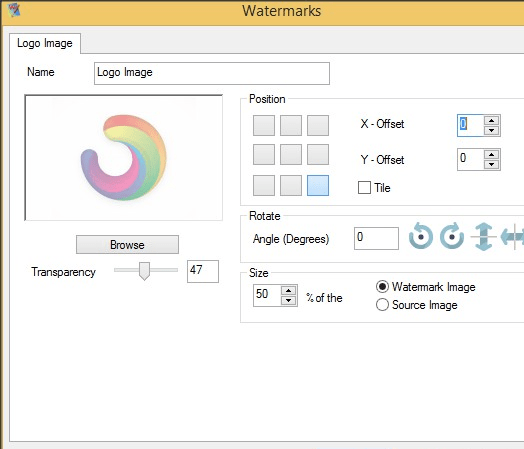
The Batch Picture Protector has comparatively small file size and has a quick and effortless installation. The opening screen has a pleasant appearance with two options at the menu bar. The selected pictures are shown in the bar below the menu bar. Through the options, files and folders can be added. The big screen space is used to show the image selected to put the watermark. One can easily see at depth how the watermark will appear. The destination and the format of the file can be chosen by the options on the down left of the screen. The right side shows the options for watermarks. You can save, or load the edited image. It also has the options on the down right side for adding image and text, also to delete or edit the text. You can customize the font and texture of the text watermark and locate its position on the image. Even image watermarks can be put and the preview of the image can be observed. The watermarks put on the images are permanent and cannot be removed by anyone. The software can accepts different format files as JPG, GIF, BMP and others. The speed for inserting watermark in batches is remarkable. You can even set the translucency levels of the watermark with great deal of accuracy.
It has a good help guide accompanying the software. The help file adequately provides all information, from installation of the software to its multiple functions. In all, the software is very useful for the artists and picture publishers on the internet. The watermarks protect the credibility of the image provider.
|
 |
 |
Visit homepage of Batch Picture Protector
Download Batch Picture Protector 2.0
Popular search terms related to Batch Picture Protector:
protector, photo editing, banner, digital photos, transparent, logo, publish, photo, url, photos
|

image protector batch watermarking copyright protection transparent images picture batch conversion combine photo digital picture information batch watermark pictures batch install adding text to photos

Programs related to Batch Picture Protector
|