
Free Downloads Center
e.g. Image Resize Guide Lite 1.0

Top in this section

JAlbum

Free popular web photo album generator. Drop folders containing image and movie files onto JAlbum. JAlbum will create thumbnails of your images and display them in index pages in HTML.

Latest Reviews

Calendarscope

Calendarscope
Calendarscope is an all in one program that allows you to plan, manage and schedule your important events and dates.

Crypt4Free

Crypt4Free
Crypt4Free is a free to use safe and reliable encryption and decryption program with power and capability.

Subscribe

Image Resize Guide Lite 1.0 Download

Editor's rating  
Users' rating   (3 votes) Rate it!
License Freeware / $0.00
Downloads 444
Publisher Two Pilots
File size 3096K
Date added 30-Apr-2009
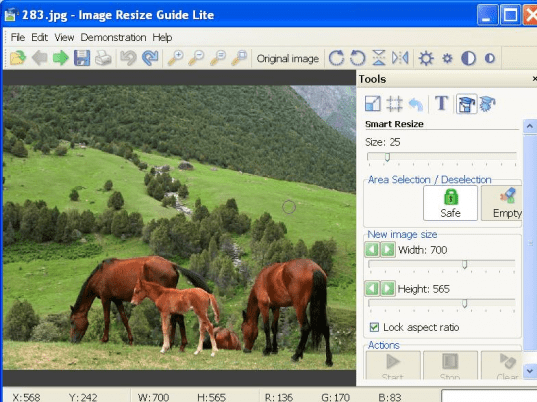
Image Resize Guide Lite screenshot

Enlarge screenshot

Publisher's description
Editor's review
Submit your review

Allows you to make context-sensitive changes to the image size and aspect ratio by removing "unnecessary" portions yet keeping the "important" features intact.
Removes objects from photos without visible traces. The best results are achieved against the background of snow, wather or greenery.
Important areas can be specially marked.
Ease to learn and use. Includes stepwise animated demo samples.
Offers these tools:
Resize;
Crop;
Smart Remove;
Smart Resize;
Smart Path.

Editor review: Reviewer, 2009-05-28 10:30:00

Allows context-sensitive changes to the image size and aspect ratio by removing "unnecessary" portions yet keeping the "important" features intact. Removes objects from photos without visible traces. Important areas can be specially marked.

Features: Image Resize Guide lets you resize images. The changes to the image size and the aspect ratio are context sensitive. It retains the "important features yet can remove "unnecessary" portions. Functionalities that are available include resize, crop, smart remove, smart resize and smart path. Objects are removed from photographs without any visible traces. Best possible results can be obtained when there`s a background of snow, greenery, water etc. When you open a photograph you can do basic contrast and brightness enhancements on the images before you try the resize operations. Rotate and flip operations are also available. File operations are the usual stuff. Edit lets you simply undo/redo the operations carried out by the application.

One of the menu options has demos to indicate the various operations available with the program. The view menu has various zoom options. Resize, crop, smart resize and smart path are options available. When doing the operations you can opt to save some details that you want to be retained.

Overall: Smart remove looked impressive in the demo. Here you can remove objects from a photograph without distorting it. You can do resize also at the same time. You protect things against removal or distortion. The smart removal is not available with the free version. While demos looked impressive the trial photograph which was that of a laptop had its edges distorted. Essentially there`s always this possibility based on the type of photograph. It seems to work best in landscapes etc.

Visit homepage of Image Resize Guide Lite

Download Image Resize Guide Lite 1.0


image crop
image resize
two photos in one
smart tools
crop image
make 3d photos
next image
background remove
let it snow
resize crop

Programs related to Image Resize Guide Lite

Copyright © 2001-2009, Free Downloads Center.