

 |
 |
|
|
 |
 |
 |
 |
|
|
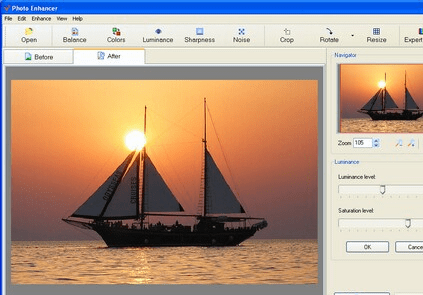
Do you want to maximize the potential of your photos without spending hours in front of a computer? AMS Photo Enhancer provides a quick and easy way to improve the quality of your photos. It reduces digital noise, corrects poor color, white balance and sharpness, fixes the dark corners problem and remove red eye. Photo Enhancer allows fixing all the problems frequently encountered in photographing, and achieving natural color rendition, high detail and optimum illuminance level. Working with the program is easy and comfortable.
With one click you will achieve results so good your picture may need no further enhancement. With a rich functionality and range of features, Photo Enhancer lets you go beyond basic photo editing and achieve professional results. With advanced photo-editing tools at your fingertips like exposure correction, selective color saturation and noise reduction theres no limit to what you can accomplish.
Photo Enhancer improves sharpness of blurred images. It happens that the camera fails to focus on the object of shooting and it comes out unsharp. This mode can save such out-of-focus images. You can refocus the whole image or bring only certain element of the image into focus.
The program allows to resize images with high quality, rotate and crop photos. You may also optimize JPEG to save files for web sites. Photo Enhancer is a professional quality, yet easy-to-use program for achieving your photos´ greatest potential.
|
|
Editor review: Reviewer, 2009-03-23 03:59:00
Photo Enhancer provides a quick and easy way to improve the quality of your photos. It reduces digital noise, corrects poor color, white balance and sharpness, fixes the dark corners problem and remove red eye.
Features: AMS Photo Enhancer provides some quick and easy edits of digital pictures. Instead of fiddling with a sophisticated photo processing package, this lets you apply some quick and easy tricks to enhance photographs. It reduces digital noise, corrects poor color, white balance and sharpness, fixes the dark corners problem and removes red eye. This provides you these quick controls for the most common problems and lets you correct those with one click operation most of the times. If you go with the default settings, it is definitely just one click that it takes to get the desired effects. Color/white balance corrections, luminance/brightness adjustment, sharpness and noise filtering are some of the features directly available. There`s an expert mode that is a one button control for applying all the corrections with default settings.
Crop, rotate and resizer are some of the manual tools available for frequently required operations. Together these features help implement exposure correction, selective color saturation and noise reduction etc. Reducing blur is achieved through the sharpness control. When saving the images in JPEG format you can trade off the quality of the image with the file size easily. Most of the corrections/edits involve is organized such that the display shows the default setting relevant to the operation. If you are a novice or are satisfied with these setting, simply go ahead. But for experienced users the settings can be adjusted easily and you get the desired results.
Overall: You can get fairly sophisticated edits done on your photographs with this editor.
|
 |
 |
Visit homepage of Photo Enhancer
Download Photo Enhancer 1.25
Popular search terms related to Photo Enhancer:
natural image, natural images, color correction, photo editing, maximize, digital camera, digital photos, resize, optimize, camera
|

resize picture easy photo editing digital photo editing image crop digital editing jpeg image digital camera tools picture crop editing digital photos jpeg crop

Programs related to Photo Enhancer
Batch Photo Processor is for batch image/pdf processing batch lists of files in sequence, image files supported are BMP, JPG, GIF, TIF, PNG Images & P...
What ever the name is, it is not so hard to use it. Basically, what you can do with it is cool pictures. You just take one picture as a pattern and a ...
SWF Quicker is the leading Flash SWF editor. This best flash animation editor can edit SWF files or create professional Flash animations from scratch....
Have you ever struggled to create professional quality web site
graphics, particularly web site headers? If so, the FREE XHeader software
is just th...
Daniusoft Digital Music Converter is a great DRM removal and conversion program. It supports these DRM: wma, wmv, m4a, m4b, m4v, asf, aac and plain: w...
Turn ordinary snapshots into beautiful portraits! AMS Beauty Studio helps photographers and amateurs to enhance digital portraits by adding that final...
Panoweaver is the world-leading panorama stitching software. This version supports stitching single row/multiple rows images taken by normal lens, wid...
Home Photo Studio is powerful and easy-to-use photo editing software offering a complete set of image manipulation tools. Thanks to a convenient inter...
Altysoft Free iPod Video Converter is a free iPod video converter that converts video files, YouTube videos, so you can play the videos on your iPod. ...
With My Flexible Dictaphone users can record dictations in 4 audio formats, transfer dictations from portable dictaphone devices, send them via e-mail...
|