
Free Downloads Center
e.g. Photo Gadget Pro 2.5

Top in this section

JAlbum

Free popular web photo album generator. Drop folders containing image and movie files onto JAlbum. JAlbum will create thumbnails of your images and display them in index pages in HTML.

Latest Reviews

Smart Mail Checker

Smart Mail Checker
Now important email will not be left un-noticed, Smart Mail Checker will efficiently let you know the arrival of each and every mail.

Sonarca Sound Recorder Free

Sonarca Sound Recorder Free
Sonarca Sound Recorder Free is a free to use audio recording tool with the capability to make quality audio recording.

Subscribe

Photo Gadget Pro 2.5 Download

Editor's rating  
Users' rating   (2 votes) Rate it!
License Shareware / $19.90
Downloads 3003
Publisher XemiComputers Ltd.
File size 2037K
Date added 10-Sep-2008
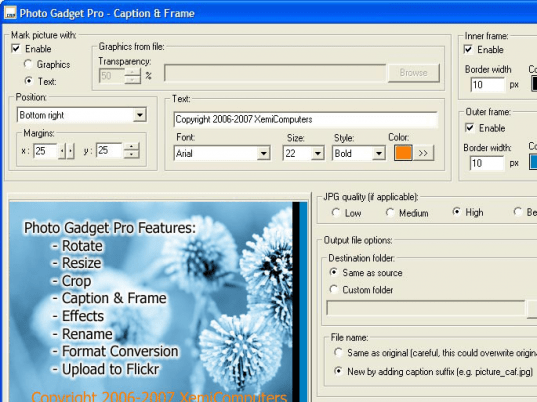
Photo Gadget Pro screenshot

Enlarge screenshot

Publisher's description
Editor's review
Submit your review

Photo Gadget Pro is a shell extension that adds image editing options to Windows Explorer. It can rotate, resize, crop and rename images, add a caption and/or frame, apply different effects and filters (grayscale, invert colors, sepia, flip horizontal/vertical), carry out format conversions and upload directly to Flickr accounts. To use the program simply select image files to work with in Explorer's window, right click the selection and choose an action from the context menu. Supported image file formats are BMP, TIFF, PNG, PCX, TGA and JPG with four levels of compression. You can set a target file size for resizing and conversions to JPG format and get lossless rotation on JPG files. Crop function includes free rectangular selection, fixed size crop area and keep aspect option to constrain proportions while selecting crop area. When adding a caption you can choose between typing in text or using a graphics file. Framing is simple, single or double outline where you set width and colors. Multiple file rename mask is provided with several options including an automatic counter. If you have that kind of camera Photo Gadget Pro can also rotate images based on EXIF information.

Editor review: Reviewer, 2008-01-21 08:20:00

Photo Gadget Pro is a shell extension that adds image editing options to Windows Explorer. Simply select images to work with, then right-click the selection to rotate, resize, crop, rename, apply effects, convert formats or add caption and frame.

Pros: Photo gadget pro adds an extension to the Windows explorer that lets you do some image processing functions without the need to get the images into a full-fledged image processing application.

Functions that can be carried out are rotate, resize, crop and rename images, add captions, apply a set of filters and change format. On installation it adds options on the right click menu on the windows explorer when an image file is selected.

Effects and filters that could be applied are grayscale, invert colors, sepia, flip horizontal/ vertical etc. Image format supported are BMP, tiff, PNG, PCX, TGA and jpg. Four levels of compression are offered. One could set a target file size for resizing and conversions. Crop operation can maintain the aspect ratio if needed. Save images from the explorer too after the operations are done.

Caption text can be typed in use a graphic file as input. Simple framing options are single or a double line with choice of colors and width of the lines. File rename can done through a rename masks with an automatic counter that can rename a whole series of pictures automatically. EXIF information, if available can be used to rotate images appropriately.

Parameter choice interaction panels are well designed and lets parameters be set properly.

Cons: Nothing problematic detected.

Overall, a simple, quick and easy way of doing basic image processing functions without needing a sophisticated image processing package. This application does the job well with a nice interface and deserves a 4 star rating.

Visit homepage of Photo Gadget Pro

Download Photo Gadget Pro 2.5


photo file rename
crop mpeg
jpg resize
image border crop
how to crop audio files
crop images
divx crop
convert jpg to tga
size explorer pro
resizing jpg

Programs related to Photo Gadget Pro

Copyright © 2001-2009, Free Downloads Center.