


Editor's review
Inadequate lighting condition has always been a cause of concern for the professional photographers. Such a condition imparts dull colors to the images, affecting the overall image quality by a great extent. In a bid to deal with such circumstances, photographers often require a suitable tool that can help you correct and enhance the colors of your images. Well, if you’re looking for such a tool, then just hold on, as Alamoon Color Enhancer 1.1 is there to help you through. The utility includes the necessary image color attributes that can be modified to make your images look vibrant and beautiful. The color enhancer works in wizard form taking you through a sequential enhancing process. It lets you alter image color attributes like contrast, tone, sharp, white balance, etc, and thereby help you to tune your image’s appearance from dull to vibrant.
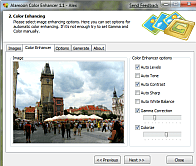
The wizard style interface of Alamoon Color Enhancer 1.1 helps you to make necessary selections in proper order. The first step in the process is to choose individual files or entire image folder for color correction. The selected images are queued up at main screen, highlighting any from which would display its thumbnail view with the Preview window. Next to this step is ‘Color Enhancing’ which includes Color Enhancer options; Auto Levels, Auto Tone, Auto Contrast, Auto Sharp, Auto White Balance, Gamma Correction, and Colorize. Enabling and setting the provided features, you can see their immediate effect on the image in preview area. If you’re satisfied with the changes, just press Next to move to further step. This step requires you to choose the ‘Destination Folder’, file format, and image size to get the desired output. Now, the final step comprises of the option to Start Enhancing process of the chosen images. When the enhancement completes you’re shown operation log, after which you can press ‘Next’ to access the output folder.
With the Alamoon Color Enhancer 1.1 you can quickly enhance the color of your images to make them look beautiful and attractive. The tool doesn’t involve any complex process or features, hence is easily operable for all, considering which it has been justifiably assigned with 3.5 rating points.
User comments