


Editor's review
Manga Studio EX Mac 4.0 is a Manga and comic creation application, specially designed for providing expert art tools for Manga artists. It aids you in saving time while increasing productivity along with the provided customizable tools. You can effortlessly draw using a pen tablet and give life to your drawings through special effects and several colors. It also supports importing 3D objects and rendering them as your artwork’s backgrounds. Further, with the program you can easily import and export the known file formats and finally publish a professionally designed Manga for web or print. With numerous screen tones; impressive tools for drawing and coloring; in-depth layout and rendering ability, the utility proves to be much beneficial for the Manga/comic artists. It comprises of several features like color set, vector toolkit, filter set, story editor, text input, special rulers, pattern brushes, and more.
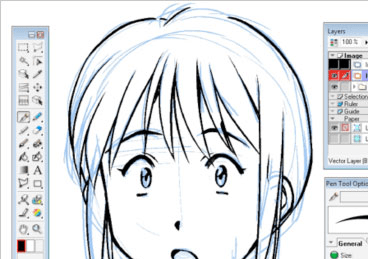
The Manga Studio EX Mac integrates an fantastic function-set to enable you in creating Manga image or entire comics. The mid space of the utility shows the images that you draw, whereas the tools are placed over the left and right panels. Using a pen tablet you draw the desired shapes and images easily to create a comic and Manga image. The tools to draw, select, crop, eraser, add text, shapes, and other features are presented over the left pane. You can easily work with layers to draw and add various other effects to the image. It also allows you to adjust colors, hue, saturation, distort images, and add sparkle and rain effects for beautifying your artwork. Further, you’re provided mesh transformation, additional 3D objects, export formats, additional word balloons, extra pattern brushes, and several other functions to alter you artwork with.
Manga Studio EX Mac software allows you to easily create comics or Manga artwork using different supportive tools. Owing to its wonderful features and marvelous functioning capabilities, the utility deservingly is given rating at 4 points.
User comments