


Editor's review
PopChar is a utility application that lets you insert special characters, accented letters, umlauts, etc., into documents. No need to search for and remember keystrokes.
Pros: PopChar utility lets one type in special characters such as accented letters, umlauts, Cyrillic version or may be Arabic characters or even a set of graphic symbols. No special sequence of keystrokes to be remembered.
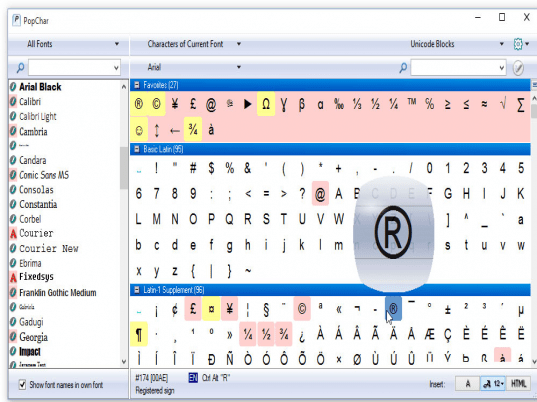
One just has to click on the character from the table displayed by PopChar. A pop up bubble clearly shows how the selected character would look like in the document.
In case of Unicode coded characters, all the characters are shown in neatly arranged categories in the table. The application is marvelously simple to use, detects font being used automatically. There are several options of how you would want to insert the character, directly as the alphabet symbol or HTML.
Unbelievable interface! Characters that are available are arranged in blocks neatly. As one mousse over them a nice pop up bubble shows what the character would look like on the document. All it takes is a click on the character on the Pop Char window to get it inserted at the cursor point of the document. The list of fonts is shown by the side of this display table. One could hide it easily as you do not need it.
The bottom panel shows the keystrokes required if one were to use the keyboard to enter the character. Alternately it shows the HTML code that would be entered if that option was chosen. One could chose to have the characters directly and the point size is easily selectable.
Cons: Things could not have been easier - nothing adverse or problematic is noticed.
Overall: A 5 star application without doubt.
User comments