
Free Downloads Center
e.g. Fast Photo Renamer 4.22

Top in this section

JAlbum

Free popular web photo album generator. Drop folders containing image and movie files onto JAlbum. JAlbum will create thumbnails of your images and display them in index pages in HTML.

Latest Reviews

Auto Clear Cookies

Auto Clear Cookies
Auto Clear Cookies is perfect for your Internet Explorer and Mozilla Firefox with the ability to clear or purge cookies for a single website or domain name.

Magic Speed

Magic Speed
Magic Speed, the reliable and handy application that will tune-up your system to maintain an overall superior performance.

Subscribe

Fast Photo Renamer 4.22 Download

Editor's rating  
Users' rating   (0 votes) Rate it!
License Shareware / $19.95
Downloads 5750
Publisher Alexander G. Styopkin
File size 913K
Date added 28-Sep-2009
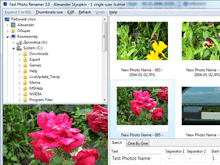
Fast Photo Renamer screenshot

Enlarge screenshot

Publisher's description
Editor's review
Submit your review

Do you want to rename files with your photos quickly and comfortably?

If you are not happy about such names of your photo files as "Img_0275.jpg", "Dsc00403.jpg", you need a tool to solve this problem - it is Fast Photo Renamer. You can rename either each photo separately or all photos in a folder at once.


How does it work?

One-by-one mode.
Select a folder with photos, look at the lower-left corner of the window, think of a new name for the photo, type it, press "Enter" and the program will show you the next photo.

Batch mode.
Specify a template consisting of a prefix, the position where the numeration should start and the number of digits to be used in file names. Click the "Rename" button.

You can view and rename files of the following formats: JPG, BMP, TIF, PSD, PCX, PNG, TGA, WMF.

Able to rename photos according to the EXIF date.

Editor review: Reviewer, 2007-08-13 07:18:00

Fast Photo Renamer software lets you rename your images all at an instance. The software is good to be used by anyone irrespective of their technical expertise. It’s easy and can be operated without any trouble. You can get rid of the names given by while loading from internet or digital camera.

The system gets into your system with a smooth download and a trouble free installation. The launch screen is simple and uncomplicated. There are options on the top to perform the tasks relating to the renaming. The first option is for expanding 1 to 001 for renaming purpose. You can also increase the size of the thumbnails of the images with the ‘Thumbnail size’. You can also select that the EXIF information should appear by dates or both time and date. If the image does not have EXIF information then you can also get it with creation date and time. The software also has the option for refreshing the program just as your computers. The selection can be made from the upper left box showing all the folders and files of the computer. You can also see the preview of the image by clicking on the name. Preview makes it easy for you to name the picture accordingly. On the right side appears the preview of the names to be assigned. The program also provides you with functions; ‘Batch’ and ‘One By One’. The batch function allows you to rename all the images of the folder at the same time. The images can be renamed individually by one by one option. The order of name can be selected to text with date and number, text with number and others. The text is written, the separator is decided by the options. Then press rename and its done.

The software’s help file gives the introduction and tells about most of the functions of the program. In a nutshell it’s a useful utility rename the images according to your choice or event wise.

Visit homepage of Fast Photo Renamer

Download Fast Photo Renamer 4.22


jpg view
batch rename file
photo compression tool
psd to jpg mac
fast folder
photo edit by date
extract photo
png photo editor
rename wma
photos files

Programs related to Fast Photo Renamer

Copyright © 2001-2009, Free Downloads Center.