

Free Downloads Center
e.g. AKVIS MultiBrush 4.0

Latest Reviews

Visual Importer

Visual Importer
Visual Importer, the only versatile tool that can export, transform or load database data at the rate of 14,347 records per second.

AutoTRAX Design Express

AutoTRAX Design Express
AutoTRAX Design Express is a very useful Electronic Design Suite specially designed for Electronic Engineers.

Subscribe

AKVIS MultiBrush 4.0 Download

Editor's rating  
Users' rating   (2 votes) Rate it!
License Shareware / $49
Downloads 3804
Publisher AKVIS Software Inc.
File size 17492K
Date added 6-May-2009
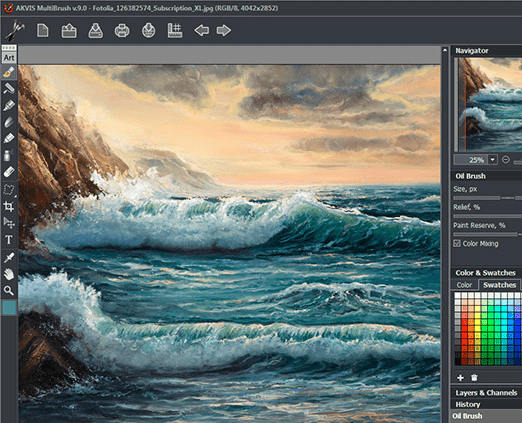
AKVIS MultiBrush screenshot

Enlarge screenshot

Publisher's description
Editor's review
Submit your review

Retouch photos and enhance portraits quickly and easily. AKVIS MultiBrush helps artists, photographers and home users to perform portrait enhancement, retouch image flows and remove unwanted objects from digital pictures. Available as a stand-alone product or a plug-in for Adobe Photoshop, AKVIS MultiBrush removes wrinkles, scars, scratches, and enhances imperfect skin on portraits in the most natural way. Spots, stains, and dust are easy to mask and remove.

Chameleon Brush heals skin problems and removes dust, spots and scratches without affecting background texture, lighting or colors. This unique brush is similar to Adobe Healing Brush, yet offers more flexibility and customization options. AKVIS MultiBrush makes the advanced healing tool available for stand-alone customers and users of photo editing products such as Adobe Photoshop and Photoshop Elements, Corel Paint Shop Pro, PhotoImpact, and Photo-Paint, ACD FotoCanvas and Photo Editor, Picture Publisher Pro, Bodypaint, and many more supporting Adobe Photoshop plug-in architecture on Windows and Mac platforms.

Artistic Cloning makes AKVIS MultiBrush truly unique. This innovative mode makes it possible to clone parts of a picture in a really smart way. Sample, resize and re-source parts you`re about to multiply through the image, and create truly impressive collages with little effort.

There are many more tools in AKVIS MultiBrush to retouch and enhance portraits, restore scratched pictures, and create artistic collages and compositions. All pens and brushes found in AKVIS MultiBrush feature automatic adjustments to preserve the original`s color and tonal range, texture and brightness, lighting and shadows. As a result, the restored part of the image or the cloned object blends into the original background seamlessly and looks absolutely natural.

Editor review: Reviewer, 2009-05-20 09:52:00

A competent image editing tool is indispensable for professional photographers, artists, or other image enthusiasts. Such tool helps in enhancing the quality of images and thereby makes your album look more impressive. Though the online marketplace is currently flooded with a wide range of image enhancement tools to do away with a variety of image defects and flaws, but majority of these tools are too complex to handle. However, if you’re looking for an easier but effective image enhancement tool then AKVIS MultiBrush 4.0 is exactly what you’re looking for. The utility makes it fun for you to retouch and enhance your entire images and portraits using the self-explanatory features. It’s competently can function as a standalone tool or work as a plug-in tool for Adobe Photoshop.

The AKVIS MultiBrush helps in removing or masking spots, wrinkles, scratches, stains, scars, dust, and enhancing imperfect skin. To giving your images an appealing appearance and applying different effects, you would’ve to load the image with the program. The selected image would be placed at the center workspace where you can apply the changes and view the effects instantly. The various tools have been placed with left column for instant accessibility, which includes color brush, eraser, clone stamp tool, chameleon tool, blur tool, smudge tool, lighten tool, eyedropper, hand tool, and zoom tool. The right side panel has been set for displaying the sub-features relating the selected tools along with color, swatches and history tabs. You can place different effects on your images giving them a stunning appearance by removing unwanted objects, stains, cloning an image portion on any part, and drawing with color, etc. Save the image with JPEG, BMP, PNG, or TIFF format.

AKVIS MultiBrush 4.0 facilitates improving and retouching your images with various provided effect tools. For its effective range of features, quality results and proficient performance in enhancing images, the software has been rated with 3.5 rating points.

Visit homepage of AKVIS MultiBrush

Download AKVIS MultiBrush 4.0


paint photo shop
photo paint shop
adobe photo
photoshop photo
adobe photoshop shareware
adobe photoshop elements
adobe photo editor
adobe photoshop editor
photo retouch
image retouch

Programs related to AKVIS MultiBrush

Copyright © 2001-2009, Free Downloads Center.