

Free Downloads Center
e.g. AKVIS SmartMask 2.5

Latest Reviews

Animated Wallpaper Maker

Animated Wallpaper Maker
Add life to your desktop, decorate it with self created animation wallpapers with the help of Animated Wallpaper Maker.

Pimero Free Edition

Pimero Free Edition
Pimero Free Edition, perfect for private use this program will manage and organize all your personal information, appointments, emails, contacts, tasks and notes.

Subscribe

AKVIS SmartMask 2.5 Download

Editor's rating  
Users' rating   (1 votes) Rate it!
License Shareware / $120
Downloads 1915
Publisher AKVIS Software Inc.
File size 14289K
Date added 11-Jun-2009
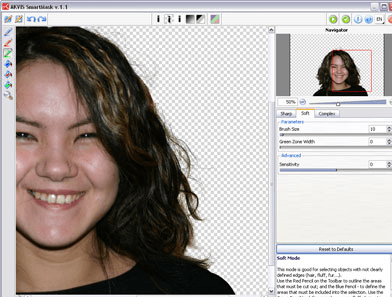
AKVIS SmartMask screenshot

Enlarge screenshot

Publisher's description
Editor's review
Submit your review

AKVIS SmartMask plug-in is an efficient selection tool.

Making selections on images takes up much time. Use of AKVIS SmartMask plugin considerably increases your productivity and saves you time.

The tool makes the selection you want, understanding where the borders of the object end.

There are three modes tailored to different selection types: Sharp, Soft and Complex. The program even allows you to get rid of the color tint left on the cutout object by the environment. In most cases objects on a photo are not evenly lighted, the cutout object can have shades and colors reflected from the nearby objects. Such color shades can be absolutely inappropriate on a new background: for example, hair having a blue cast from the sky or a green shade from the trees, shadows of objects on the clothes. This mask tool helps to get rid of the unwanted color shades.

Now, you can spend less of your time on selection of objects and more of it on creativity.

Try the plug-in for 10 days for free!

Editor review: Reviewer, 2008-02-20 07:49:00

Complex area selection on an image is quite often required to apply processing created by play of light and shadow. AKVIS SmartMask is an efficient masking tool that saves you time on complex selections.

Pros: AKVIS SmartMask is an efficient masking tool that allows very complex selections. The application installs as a plug in into other packages such as Adobe Photoshop, Photoshop elements, Corel, Paintshop Pro etc. and allows image processing operations to be carried out after masking is used through this plug-in.

There are three modes; sharp, soft and complex. In the sharp mode where boundaries of the object to be retained and the other objects to be removed are sharply defined. A blue pencil defines the area to be retained and a red pencil metaphor used to draw red lines to indicate area to be cut out is enough to define the boundary of the image areas to be retained and what is to be deleted.

In the soft mode a third pencil, a green pencil is added. The blue and the red pencils work the same way. Yet the boundary area may be soft as hair, fur, fluff etc. The green pencil then defines this soft area so that the basic image processing program can take care of the soft boundary.

In the complex mode the boundary may be even more fuzzy as in an object and its background in similar color ranges. Thus the boundary edge may be uneven. A touch up brush is used to take care of the unevenness.

The program even allows you to get rid of the color tint left on the cutout object by the environment; for example, hair having a blue cast from the sky or a green shade from the trees, shadows of objects on the clothes. This mask tool helps to get rid of the unwanted color shades.

Cons: No problematic issues.

Overall, this is a 4 star rated tool that integrates well with the base image processing system.

Visit homepage of AKVIS SmartMask

Download AKVIS SmartMask 2.5


pencil graphics
clothes off
movie en photo tool
photo borders
color selection
green background
photo mobile
photo to avi converter
digital photo fun
make photo on dvd

Programs related to AKVIS SmartMask

Copyright © 2001-2009, Free Downloads Center.