
 |
 |
|
|
 |
 |
 |
 |
|
|
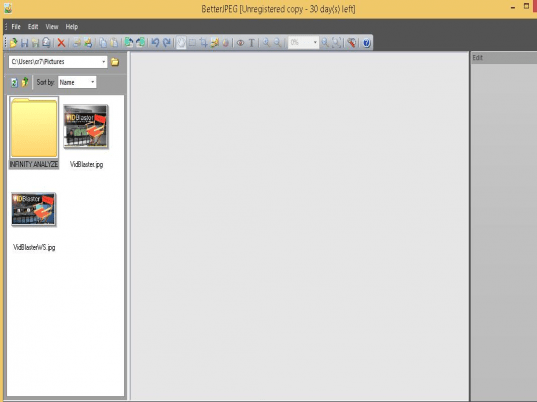
BetterJPEG is a JPEG editor specifically designed to avoid recompression loss when editing and resaving JPEG photos. BetterJPEG takes advantage of the fact that JPEG images consist of a number of small independent blocks and does not recompress blocks that don't have to be changed, retaining original quality and sampling settings.
The list of lossless operations supported by BetterJPEG covers the essentials of digital photo processing, which, in combination with intuitive GUI and state-of-the-art image processing algorithms, makes it an indispensable tool for digital camera owners. BetterJPEG makes it easy to quickly process multiple images.
Main features:
- Lossless transformations - rotation, flip
- Lossless crop (free, fixed aspect, fixed size, predefined and user-defined aspects and sizes)
- Highly customizable lossless date/EXIF info/text insertion. Flexible templates allow to imprint data directly from metadata contained in images: comment, date, time, exposure, f-number, ISO, focal length, device make and model, file name, copyright sign and add your own description to images.You can select the desired language, font face, size, color, background, opacity, placement, date/time format, etc.
- Advanced lossless red eye removal BetterJPEG does not simply desaturate the pupil or do a color replacement, instead it utilizes a sophisticated technique allowing to remove the red tint without affecting other color channels, giving the eyes a natural look. It also performs antialiasing to avoid jagging on the pupil's edge. Sensitivity and darkening can be adjusted for better look. Pixels outside the edited area don't get recompressed.
- Copy/Paste to external editor and back allows for local retouching or watermark/banner insertion without full recompression.
- Batch and fast one-by-one image processing
- Multi-level Undo/Redo
- Metadata preservation
- Compression optimization
|
|
Editor review: Reviewer, 2008-03-24 06:17:00
BetterJPEG is a JPEG editor specifically designed to avoid recompression loss when editing and resaving photos. Rotation, flip, crop, red eye removal, date/text/EXIF data imprint and more features are available. Process images in a batch.
Pros: BetterJPEG avoids re-compression loss by design when carrying out any of the edit features on JPEG images. This is accomplished by the fact that JPEG images have a number of small independent blocks of data and whichever block has not been changed need not be compressed again. Original sampling and quality are retained that way.
A host of features are supported in the application which due to the latest algorithms are able to manage least amount of losses due to compression carried out. Digital images produced by cameras and processed through this application thus can produce very optimal results. Batch processing supported by the software makes the whole process quite quick.
The lossless features that are supported briefly are rotation and flip, several ways of cropping a picture. These modes include free, fixed aspect, fixed size, predefined and user-defined aspects and sizes. Date/EXIF information and text information allow a lot of metadata to be imprinted on the image itself. These include comment, date, time, exposure, f-number, ISO, focal length, device make and model, file name, copyright sign and description to images. You can Desired language, font face, size, color, background, opacity, placement, date/time format, etc. can be selected.
Red eye removal too works such that no pixels outside the eye area get affected. Photos can be copy pasted to an external editor and brought back after processing. The interface is simple, easy to use even for amateurs. Photos can be mailed to family and friends right from the application.
Cons: Most rudimentary enhancements such as contrast, brightness and color corrections would have been useful features.
Overall this is a well designed, easy to use application and deserves a 4 star rating quite well.
|
 |
 |
Visit homepage of BetterJPEG
Download BetterJPEG 1.7.2.0
Popular search terms related to BetterJPEG:
natural image, exif, natural images, photo editor, photo editing, iso, banner, cd covers, digital camera, optimization
|

exif date editing jpeg files jpeg batch converter crop an mp3 bootable iso images wma lossless red eye remove crop photo batch image watermark jpeg to mpeg conversion

Programs related to BetterJPEG
Moderal Hotcut is for any computer users who need to build websites, develop software or print a
huge picture, with an extremely easy way to cut the...
Blending a watermark into your pictures on your homepage or your eBay auctions protect your property from thievery.
For the watermark you can choose ...
2GIF is a command line graphics converter allowing you to convert images to gif format from 50 image files formats including conversions from jpeg to ...
Batch-convert large numbers of images to TIFF format with blazing speed and reliability using 2TIFFs rich command-line interface! Its reliability and ...
Boost your sales with the high quality box shots your products deserve. 3D Box Shot works great on Windows XP, 2000, NT, ME, 98 with a 600mhz CPU + O...
3D Packager is the world's best packaging software tool. You can use it easily to make your product package photos or animated demonstrations. You can...
3GP/iPod Video Converter contains 3GP Video Converter, iPod Video Converter and Mp3 Ripper,
3GP Video Converter can convert video to 3GP files that...
5DFly Photo Design enables you to create photo books, calendars, greeting cards, baby announcements and other artwork from your digital photos. It off...
Simplifies and accelerates the work of webdesigner, creates in a lightning and easily stunning multimedia Flash Slideshow, Photo-gallery, Portfolio to...
|