


Editor's review
Have your images collected together, get some cool music, recollect you imagination after that sit in front of your PC to create some wonderful banners and make beautiful slideshow. All this along with Flash Banner Creator 1.10 software would let you have amazing slideshow from your images. The software is good not just for professionals to create ads banner, etc but it’s easy to be operated by even the normal users. So get started, what arte you waiting for?
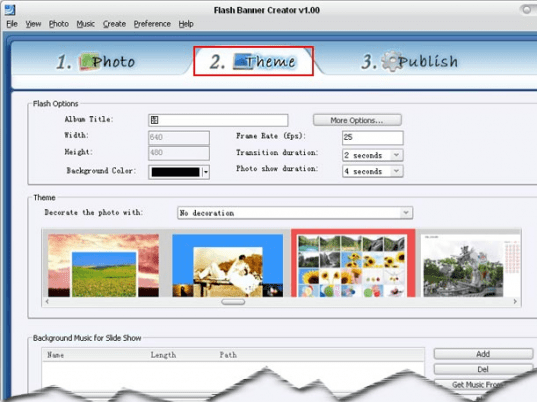
You can have your pictures formed into wonderful musical slideshow and that just needs downloading and installing theFlash Banner Creator 1.10 software. The user interface of the program is easier for even the normal users. You simply need to select the images that you want to be included in the slideshow. Beautiful flash animations are created with the help of the program. The selected pictures are shown in the middle screen you can arrange the sequence as you want them to be in. Then you select from the different themes that are given with the program to make your images more attractive and magnificent. You can change the various aspects by changing the time duration, frame rate and different other options are given. Add up some happening kind of music to be played in the background with the slide show. Even you can have the music played so you can have the confirmation of the right file. After making then selection of the settings for the slideshow then you just need to go to the ‘Publish’ option. Then you can make the selection for creating a flash file or burn the slideshow to a CD/DVD. When the work is done, then you just need to check out for the slideshow that you have prepared. Open the folder or view the slideshow. You have so many options to work on with and help is there for guiding you.
The software has been deservingly given the 4 rating points for the spectacular results it can create. It will let you have the beautiful and amazing slideshow whether it’s your memories or whether it’s your professional work.
User comments