
 |
 |
|
|
 |
 |
 |
 |
|
|
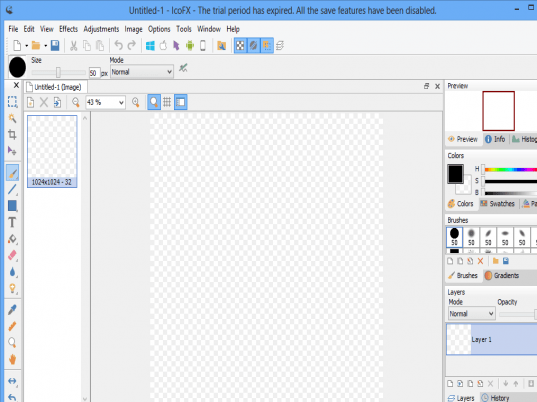
IcoFX is an award winning freeware icon editor. It is an all-in-one solution for icon creation, extraction and editing. It is designed to work with Windows XP, Windows Vista and Macintosh icons supporting transparency.
With a wealth of tools and more than 40 effects at your fingertips, there’s virtually no limit to the icons you can create. You can easily convert your favorite images into icons, or icons into images. IcoFX gives you the possibility to create icon libraries or change icons inside exe files. Create a favicon for your website or blog.
Convert your Macintosh icons to Windows icons and vice versa. With IcoFX you can extract icons from other files, including Windows Vista and Macintosh files. You can easily work with multiple files using the batch processing capability of IcoFX.
Main Features:
# Support for Vista icon with PNG compression
# Create icons for Windows 98 / ME / 2000 / XP / Vista
# Support for Macintosh OS X icons
# Convert Macintosh icons to Windows icons
# Create icon libraries
# Create favicon for websites or blogs
# Easily convert images to icons
# Add, change or delete icons inside exe files
# Support for transparency (alpha channel)
# Batch processing for import, export and extract
# Multiple language support
# More than 40 effects + custom filter
# Resolutions up to 256x256
# Data types: 2, 16, 256, True Color, True Color + Alpha
# Extract icons from 32 bit exe and dll
# Import and export images
# Transparent, Brighten/Darken, Blur/Sharpen tools
|
|
Editor review: Reviewer, 2008-05-22 09:31:00
IcoFX is a freeware icon editor. It is an all-in-one solution for icon creation, extraction and editing. It is designed to work with Windows XP, Windows Vista and Macintosh icons supporting transparency.
Pros: IcoFX is a icon editor. It is an all-in-one solution for icon creation, extraction and editing. It is designed to work with Windows XP, Windows Vista and Macintosh icons supporting transparency. A variety of tools are available along with some 40 odd effects that can be used to create impressive icons. Possibilities are limitless. Images can be converted into icons conversely icons can also be turned into images. IcoFX gives you the possibility to create icon libraries or change icons inside exe files.
It is easy to covert a Mac icon file into a Windows compatible one and vice versa. Extractions of icons also work reversibly between these two systems without a problem. There’s a batch processing facility available too.
This application is useful in a wide range of operating systems. One can create icons for not only Windows 98/ME/2000/XP or Vista but also PNG compression based icons for the Vista environment too. Same goes for icons in the Mac OS X environments as well. Creating a icon library and managing the same is easy within this application.
Icon sizes that can be handled are up to 256x256 pixels. Besides color and transparency adjustments there are some image effects tools. These are brighten/darken the image/icon or sharpen/blur the same.
Cons: Nothing adverse noticed.
Overall: This is a feature rich and a very convenient and useful application that delivers on its promises. This is certainly a 5 star rating material.
|
 |
 |
Visit homepage of IcoFX
Download IcoFX 1.6
Popular search terms related to IcoFX:
blur, icon editor, transparent, dll, png, extract, true, compression, filter, exe
|

windows transparency vista images icons for blogs macintosh osx change icon exe for macintosh editing icons create your own icons convert amr files icon vista

Programs related to IcoFX
|