


Editor's review
PhotoDream can easily add many wonderful special effects onto your digital photo. The effects include Light Effect, Star Effect, Dream Effect, Color Effect, Weather Effect, Art Effect, Amazing Effect, Gradient Effect and Preset Effect.
Pros: PhotoDream applies a whole set of effects to a photo at a time. The effects are grouped under 15 categories. These categories are called filters by the publishers. Each filter set has 10 effects in them. Thus a total of 150 effects can be created.
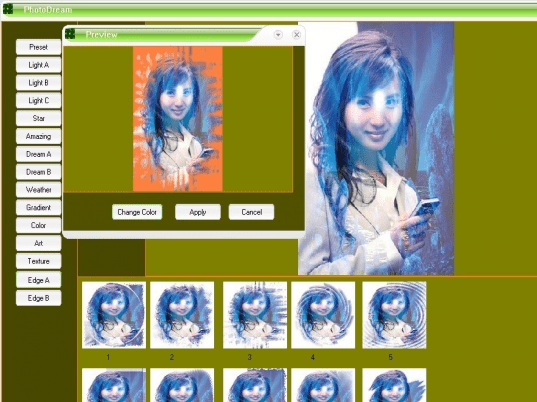
The categories are called Light Effect, Star Effect, Dream Effect, Color Effect, Weather Effect, Art Effect, Amazing Effect, Gradient Effect and Preset Effect. More than one of these effects can obviously be applied to a photo. That expands the creative range quite a bit. A single click selects one of the filters and 10 individual effects in them are shown below the target photo area. Once one requests an effect to be applied, the preview is shown immediately. Only then you confirm applying the effect and you have the modified photo immediately. Undo option helps going back fro the effect applied and starting all over again.
Overall the user interface is absolutely very simple. Just a few clicks lets you create the effect you choose to apply on the target photo.
Cons: Though there are 150 effects that one could apply on any photo, not many of these are very inspiring. Most do not have the dream like quality that can be created in a photo.
Overall: Basically the application creates a simple combination of the effect image and the target image. The effects are limited and not very imaginative so that there are very few effects in the library of 150 effects that you get anywhere close to a dreamlike quality in the output. To my mind this is a 2 star effort.
User comments