


Editor's review
Nearly every webmaster likes to have attractive images placed on their sites. Even general users like to place beautiful thumbnails on their home pages or social networking profiles. Such a desire often leads to a need for a user friendly yet powerful utility to create great thumbnails. Among many utilities that boast of satisfying such requirements the Right Thumbnails 1.3 without doubt will rank amongst the very best. It provides the users with three modes that allow you to make the thumbnails from your images easily. It also comes loaded with a speedy batch mode process that can be used to process more than one image at a time. It supports conversion from known raster and vector formats to the JPG, GIF, and PNG format.
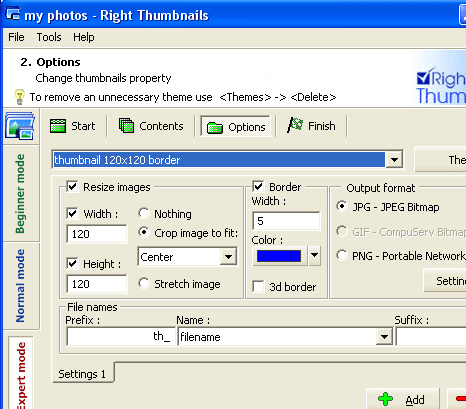
Right Thumbnails 1.3 has very intuitive step wise functioning that one get a hang of in minutes. To start with, you need to choose the mode to be Beginners, Normal and Expert Mode. The options are shown according to the mode that had been chosen by you. You can create or open a new project by browsing for the required files. Make the selection for the images that you want to create the thumbnails of and you are shown the preview of the images on the program screen. You can make the changes in the images according to the requirements and then move on to the Options settings. With the Option, you need to set the theme from the given variety. Enable various features; you can resize the image by selecting the width and the height of the image and also crop or stretch the image. Make the selection for the borders and the Output format; even change the settings relating to the set format. Set the filename click Next and the file conversion process would start and the resulting files would be stored at the defined destination.
Right Thumbnails 1.3 receives an appreciable score of 4.5 owing to its potent combination of options like multi mode conversion process, quicker conversion speed, output customization and a superlative overall performance.
User comments