
Free Downloads Center
e.g. SilverFast DC Pro Studio (Mac) 6.5.5r4

Latest Reviews

Ainvo Registry Defrag

Ainvo Registry Defrag
Ainvo Registry Defrag is a simple tool with the capability to keep your system working in a smooth and stable condition.

VintaSoftTwain.NET Library

VintaSoftTwain.NET Library
VintaSoftTwain.NET Library is a handy and useful .NET library with which you can control the working of scanners, cameras and any other TWAIN devices.

Subscribe

SilverFast DC Pro Studio (Mac) 6.5.5r4 Download

Editor's rating  
Users' rating   (1 votes) Rate it!
License Shareware / $399.00
Downloads 631
Publisher LaserSoft Imaging AG
File size 9472K
Date added 28-Jan-2008
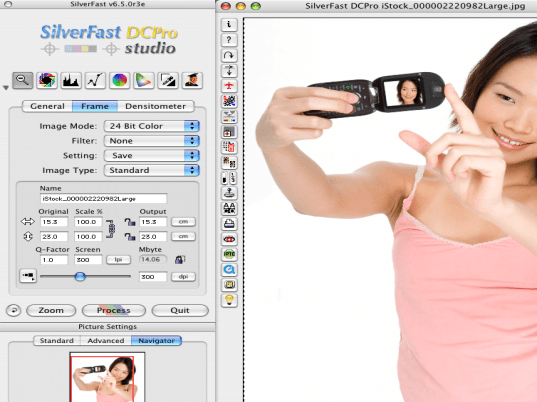
SilverFast DC Pro Studio (Mac) screenshot

Enlarge screenshot

Publisher's description
Editor's review
Submit your review

SilverFast DC Pro Studio high-end Digital Camera Software addresses the specific needs of the digital photographer. The application combines the award-winning powerful functions of SilverFast with the unique Virtual Light Table. The Virtual Light Table provides the user with the capability to effectively view, organize and manage their digital image files.
The application also provides additional essential image correction tools, such as red-eye removal, color correction, white balance, and exposure adjustment. Advanced SilverFast features, including ACR, USM, GANE, Selective Color Correction, and JobManager, allow the amateur, the prosumer and professional photographer to achieve the desired results from their digital photographic images.

SilverFast DC Pro Studio supports the Raw Data Formats for many professional digital cameras from Canon, Minolta, Nikon, Olympus, Kodak, Fuji and Sigma. The conversion of the raw data takes place as a time-saving background process and the results are stored automatically. Hence, the user can re-open converted files without losing time.

Why SilverFast DC? Work like a Pro x Control the workflow x Use the full potential of the camera's raw format x Apply SilverFast's professional color correction x Enhance your image quality x Generate printable files x Make use of many cameras x Work on Mac or PC.

For all listed cameras SilverFast also fully supports Adobe DNG as an input format. If a camera is not listed as supported, not all camera information might be present in the DNG file. Still, such DNG files can of course be read and processed by SilverFast. If your camera or the relevant profile is not available it can be created through us. For this purpose LaserSoft Imaging needs your ready-to-use camera (including a lens, battery, etc.) for approx. 2 hours at its company headquarters in Kiel, Germany. Only a few test-shots under controlled light are needed for this procedure.

Editor review: Reviewer, 2008-02-11 10:22:00

Are you a digital photographer? Then you might have a large collection of digital images that need to organized and managed. We offer you software that would help you to do this and also do other functions as well. SilverFast DC Pro Studio (Mac) 6.5.5 software would assist you to view, manage the images and also use other features such as red eye removal, white balance, color corrections, etc. It consists of the tools that make it easy for you deal with all digital images. It also helps you in the conversion of raw data and stores the results automatically.

SilverFast DC Pro Studio (Mac) 6.5.5 has the options well placed on the screen that makes it easy to use the desired options directly. The images that are being worked with are shown on the right side and the features are set on the left panel. You can manage the images by having the color balance to make the images look better. You can crop, rotate, and set the various aspects of your images. You can change the image mode, filter, settings, and image type by scrolling form the menu that has been provided with the options. Set the density and select the name, scale, screen, output, etc features. With the Picture Settings you can choose the features Advanced, Standard or Navigation. You can make the image look better then before by making improvements with the tools that have been provide with the program. It would enhance the quality of your image file, generate the image files that can be easily printed and supports many digital cameras. It also supports the features such as ACR, GANE, USM, JobManager, and selective Color Correction, etc. Whether you’re amateur or professional photographer you can achieve the desired results with the software.

SilverFast DC Pro Studio (Mac) 6.5.5 supports an easy user interface and the features that would user make the changes in the digital images as required. For the functioning and the resulting output with best quality it has been given the rating 4 points.

Visit homepage of SilverFast DC Pro Studio (Mac)

Download SilverFast DC Pro Studio (Mac) 6.5.5r4


raw conversion
canon camera
imaging studio
digital image correction
mac pro
kodak shareware
raw audio format
mac convert wmv to mp4
dvd converter for mac
undelete camera files

Programs related to SilverFast DC Pro Studio (Mac)

Copyright © 2001-2009, Free Downloads Center.