
 |
 |
|
|
 |
 |
 |
 |
|
|
Easypano Studio Standard 2009 has got all you need in creating a high quality flash panorama and making interactive virual tours.Panoweaver 6.0 Standard and Tourweaver 4.0 Standard together in this pack make professional virtual tours easily and fast.
Panoweaver is the world-leading panorama stitching software. This version supports stitching single row/multiple rows of normal photos and wide-angle photos. Both spherical and cylindrical panoramas can be created automatically. Besides stitching panoramas, Panoweaver also exports 360 panoramic images into Flash VR, QuickTime VR, and Java-based VR tours.
Main Features:
1.Stitch normal photos and wide-angle photos
2. Automatic stitching and manual stitching are supported
3.Stitch photos to spherical and cylindrical panoramas
4.Stitch photos to partial panorama/wide-angle photo
5.Stitch single row and multiple rows of photos
6.Blending features, adjust exposure values automatically.
7.Export panoramic images to full screen Flash, QuickTime and Java VR tours
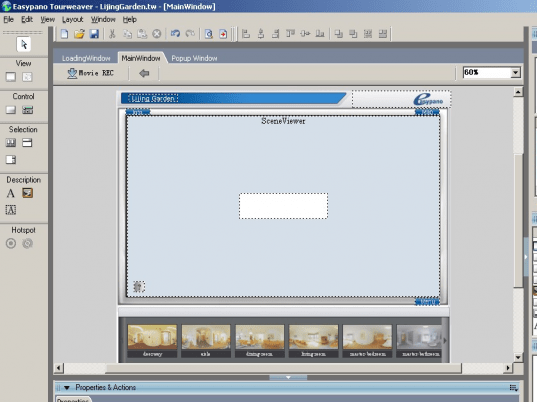
Tourweaver 4.00 is intended to be easy-to-use, practical, highly-interactive and fully-customizing. Main features includes:
1. Customize skin templates
2. 360 spherical panorama, cylindrical panorama, still images, oneshot images can be used
3. Support interactive components like buttons, thumbnails, dynamic text can be added to tour skin, and each can achieve various actions.
4.Hotspots can be added to scenes and maps to achieve various actions; radars can be added to map to indicate locations of scenes in the map.
5. Popup images and flash video are supported.
6. Flash virtual tours are exported and easily embeded to websites.
7. Full screen display of the virtual tour.
It is used for creating virtual tours for real estate, tourism resorts, museum, hotel, restaurant and various other fields.
|
|
Editor review: Reviewer, 2009-06-16 11:31:00
Developers and photographers often need to deal with a variety of difficulties while creating panoramic images or flash panoramic tours. This is because of the kind of hard work and time it takes in merging several shot images in correct pattern to form a complete view. Indeed, for performing the task they often seek the assistance of an adept application to form the high quality panoramic images or tours. If you’re looking for a competent one, then Virtual Tour Studio Standard 2009 application truly deserves a try. The tour studio has been tailored to help you generate highly impressive and good quality flash panorama, in order to create interactive virtual tours. The program comprises of Tourweaver 4.0 Standard and Panoweaver 6.0 Standard that aid you in making professional virtual tours conveniently. These studio included applications offers competent assistance in stitching panorama images and form a customized and interactive tour.
Virtual Tour Studio Standard integrates two effective utilities; Tourweaver and Panoweaver. Panoweaver allows you to stitch the several shots together to form a panoramic image view. The panoramic image created can be navigated through to view each and every area of a large physical space. Panoweaver allows you to stitch together single/multiple rows of normal and wide-angle photos for creating spherical and cylindrical panoramas both, automatically. It even lets you export 360 panoramic images to Java-based VR, QuickTime VR, and Flash VR tours. Whereas, the Tourweaver application is intended to help you generate highly-interactive, practical, and completely-customized virtual tour. It lets you add customize skin templates, and create 360 spherical and cylindrical panoramas where still and one-shot images can be utilized. It even allows you to insert interactive buttons, thumbnails, dynamic text, hotspots, maps, scenes, radars, popup images, etc, can be added to the tour skin. You can add full screen feature customize it, and turn the panoramic tour into an interactive flash video that can easily be embed with websites.
Virtual Tour Studio Standard 2009 application is helpful for photographers and developers to create panoramic view for virtual tours for hotel, tourism resorts, real estate, restaurant, museum, etc. and various other fields. The program enables you to generate wonderful panoramic virtual tours with the help of its fantastic feature-set and excellent functioning, for which it deserves to be rated with 4.5 rating points.
|
 |
 |
Visit homepage of Virtual Tour Studio Standard
Download Virtual Tour Studio Standard 2009
Popular search terms related to Virtual Tour Studio Standard:
photography, real estate, quicktime, installer, maps, skin, maker, pack, thumbnails, map
|

flash video studio map of world maker video studio video quicktime video video ts to quicktime flash video maker screen video maker virtual studio java video

Programs related to Virtual Tour Studio Standard
5DFly Photo Design enables you to create photo books, calendars, greeting cards, baby announcements and other artwork from your digital photos. It off...
View photos instantly
Never wait for an image to open again - ACDSee 2009 is the fastest viewing software around. Fill your screen with photos, zoom ...
DWF to DWG Converter featured with importing DWF files into editable DWG files, very simple to use. This is AutoCAD add-in, and request AutoCAD full t...
AutoDWG DWG2JPG converter Pro is a batch converter converts DWG to JPG, TIF, GIF, PNG, BMP without need of AutoCAD,Support AutoCAD 2009 now. With Auto...
AutoDWG DWG to PDF Converter which allows you to batch convert DWG, DXF and DWF to PDF which is easy-to-use. Supports AutoCAD 2009. Runs outside of Au...
PDF to DWG Converter Stand-Alone, a stand alone application which allows you to convert PDF files to DWG or DXF files in one easy step. It supports Au...
Do you get PDF files with CAD drawings inside? Now you can Import these PDF files and save them as DWG or DXF files. AutoDWG PDF to DWG importer can i...
AXPDF PDF to JPG converter is your best choice to convert PDF to JPEG (convert PDF to JPG), it also supports more than 8 image formats including JPG, ...
BatchMark: photo watermarking software. BatchMark features: add text watermark, add copyright sign, image watermarks, logo watermark and date to multi...
Canvas Commander is a 3D graphics tool for modeling and stereoscopic imaging. Just a few commands in a script file can show 3D obects and/or image fil...
|