
Free Downloads Center
e.g. Visual Photo++ 1.00

Latest Reviews

Free Hex Editor Neo

Free Hex Editor Neo
Free Hex Editor Neo is an intuitive program having the power and ability to View, Edit and Analyze Hexadecimal Data and Binary Files of any Size.

Framing Studio

Framing Studio
Framing Studio, as the name speaks for it, this advanced tool allows you to add eye-catching frames and borders to your digital images.

Subscribe

Visual Photo++ 1.00 Download

Editor's rating  
Users' rating   (1 votes) Rate it!
License / $35.95
Downloads 518
Publisher iTinySoft
File size 3268K
Date added 2-Jul-2008
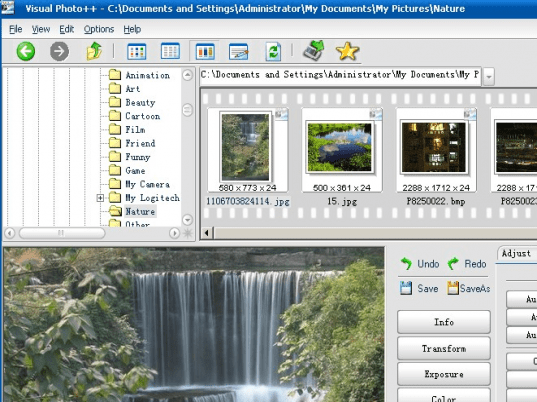
Visual Photo++ screenshot

Enlarge screenshot

Publisher's description
Editor's review
Submit your review

Visual Photo++ is a powerful utility that uniquely supports to browse photos as acdsee with popup thumbnails and retouch the photos with lots of advanced auto photo restoration and photo enhancement algorithm. Visual Photo++ is not only a comprehensive application ideal for acquiring, organizing, viewing, and sharing your images, but also a powerful photo enhancing software for automatically adjusting image's exposure, color, despecking image's noise and so on.

Unique Features of Visual Photo++ 1.0:

Browse pictures with popup thumbnails
Advanced Adaptive photo Enhancement algorithm with Color Restoration(Advanced AECR)
Advanced Adaptive photo Enhancement algorithm (Advanced AE)
Homomorphic filter to remove image's shadow
Three automatic white balance algorithm
Adjusting image's color and exporue according to other picture's color and brightness statistical features
Two powerful photo restoration algorithms to despeck or smooth your photos
Support File Formats

Import - bmp,gif jpg jpeg png ico, tif, tiff, tga, pcx,wbmp, wmf, emf, j2k, jp2,jbg, j2c, jpc, pgx, pnm, pgm, ppm, .ras
Export - bmp,gif jpg jpeg png ico, tif, tiff, tga, pcx
¡¡

Acquire Photos

Auto opening USB disk to browse photos
Supporting TWAIN interface to get pictures through image scan, USB camera, etc.
Capturing images to your image favorite box while using Microsoft Internet Explorer
¡¡

Browse Photos

No thumbnail caching but quick thumbnail browsing
Popup thumbnail and popup EXIF information
Four image view modes: Thumbnails, Detail list, Filmstrip, Edit
Mouse wheel changing picture and zooming
¡¡

Enhance Photos

Keep Exif information while processing
Image transformation including cropping, rotating, resizing and flipping
Adjust image exposure with lots of auto photo enhancement algorithm, such as: Histogram Normalization, Auto Color Contrast, Auto Advanced AECR, Auto Advanced AE, Homomorphic filter etc.

Editor review: Reviewer, 2008-07-16 09:09:00

Visual Photo++ is a powerful utility that uniquely supports to browse photos with popup thumbnails and retouch the photos with lots of advanced auto photo restoration and photo enhancement algorithms.

Pros: Visual Photo++ has two sets of functionalities. One part is a photo organizer that helps acquire, organize and share photos. Other set of functionality is a photo editing, enhancing functionality. This part can automatically adjust an image`s exposure, color, speckle removal of image`s noise and so on. Acquiring photo functionality include auto opening of USB disk to browse photos, support of TWAIN interface to get pictures through image scan, USB camera interface etc. Images are captured to your image favorite box in conjunction with the Microsoft Internet explorer. Browsing functionalities include popped up thumbnails as well as EXIF information list. Changing of picture and the zoom function can be based on the mouse wheel operated. There are four different photo viewing modes, thumbnails, detailed list, filmstrip or edit modes. Photo enhancement has a range of features. Image transformation such as cropping, rotating, resizing and flipping etc are available. Adjust image exposure with lots of auto image processing algorithm, such as Histogram Normalization, Auto Color Contrast, Auto Advanced AECR, Auto Advanced AE, Homomorphic filter and so on. Color adjustments has Auto white balance, Auto color level, Auto Color Balance, Get Color From File, Adjusting color balance kind of functionalities. Noise removal in terms of despekling are supported by robust algorithms. Other aesthetic enhancements include adding a frame, text based captions, blurring, warping and other artistic effects to the images. Several levels of undo/redo makes sure the original is not lost due to mistakes in creating effects or to get back to a known point when the compound effect created is not something you like. EXIF info is retained while processing is done. While BMP, GIF, JPG, JPEG, PNG, ICO, TIF, TIFF, TGA, PCX, WBMP, WMF, EMF, J2K, JP2, JBG, J2C, JPC, PGX, PNM, PGM, PPM and RAS are the formats that can be supported when importing; BMP. GIF, JPG, JPEG, PNG, ICO, TIF, TGA and PCX are the formats supported while exporting.

Cons: No particular problem noticed but this is the version 1.0 so trouble could be expected.

Overall: This is quite a good application that can achieve much. The interface somehow is not as clean as it could have been. Overall a 3 star level.

Visit homepage of Visual Photo++

Download Visual Photo++ 1.00


camera usb
exif view
edit jpg file
best photo edit
edit photo
edit jpeg
tif to jpeg
tga to wmf
tga file
tga jpg

Programs related to Visual Photo++

Copyright © 2001-2009, Free Downloads Center.