
 |
 |
|
|
 |
 |
 |
 |
|
|
The most important feature of WinSoftMagic Photo Editor is the ability to edit photos preserving their original quality. WinSoftMagic Photo Editor contains our most advanced JPEG compression engine and technology specially designed to preserve the original picture quality of your digital photos. You can use WinSoftMagic Photo Editor for various photo editing tasks: to resize and crop photos, adjust levels, remove red eyes, add text and watermarks, compress and reduce the file size, and more. WinSoftMagic Photo Editor is the perfect solution to get your photos ready for the Web: edit, compress, resize, make thumbnail pictures, shrink the large file size of your graphic files, optimize pictures for faster loading from the Web, e-mail smaller image files quickly and not exceeding email size limitations. WinSoftMagic Photo Editor offers you the ability to create and save 'profiles'. You can use a profile to process one or multiple photos (batch processing) just in several clicks. WinSoftMagic Photo Editor is the best choice for anyone wanting to edit or compress photos and preserve their quality. Digital camera users will benefit most from the new outstanding abilities offered by WinSoftMagic Photo Editor.
|
|
Editor review: Reviewer, 2009-08-17 08:26:00
Whether you’re into website development, professional photography, or a common PC user, you must’ve faced the requirement of an expert image editing tool to make desirable changes to your images. In case, if you haven’t been able to get a modest and adept application yet, you can try WinSoftMagic Photo Editor 2009 application. It’s a fantastic image editing tool that allows modifying images without compromising their original quality. With its wide range of editing features such as resize, crop, color adjust, red eye removal, etc, the program comprises of advanced JPEG compression functions. While editing images you can even compare the actual and modified image simultaneously, in order to derive best results.
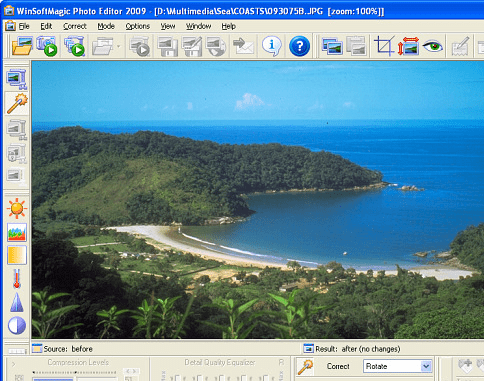
With the WinSoftMagic Photo Editor 2009, editing your images to derive desired results becomes an easy task. When you load image, you can switch view between vertical and horizontal for comparison, view resulting image only, or select quick compare. By default, the original and modified images are displayed over the screen and you can easily make changes while comparing it with the original one. Commence the editing task with image correction mode, which allows you to adjust brightness, color levels, saturation, temperature, and sharpness, and even helps rotate, crop and remove red eye from the image. You can even copy image to clipboard and resize the images as per your needs. Further with Image Compression mode, you get different functions like watermark; compressions modes named as free, original, and lossless; compression levels; detail quality equalizer; edit copyright text associated with images; rectangular/elliptic/polygonal selection area; different effects; and even more. In addition to these, you’re presented with save/load profile, prefiltering, mail image, hold target value, precision, advanced, and various other functions to perform image editing, with expertise. Even, you can directly acquire images from a scanner or a camera using the application.
WinSoftMagic Photo Editor 2009 application serves you with commendable image editing tools helping you to generate suitable results as per requirements. Owing to the extensive and incredible tool-set that aids its functioning to deliver impressive output, the program is justifiably being given 4 rating points.
|
 |
 |
Visit homepage of WinSoftMagic Photo Editor
Download WinSoftMagic Photo Editor 2009
Popular search terms related to WinSoftMagic Photo Editor:
photo editor, photo editing, digital camera, digital photos, compress, profiles, resize, optimize, image editor, camera
|

batch picture editor picture shrink jpeg photo editor how to compress jpeg photo batch editor compress text files shrink files text editor for very large files text editor very large files batch image resize

Programs related to WinSoftMagic Photo Editor
DWF to DWG Converter featured with importing DWF files into editable DWG files, very simple to use. This is AutoCAD add-in, and request AutoCAD full t...
AutoDWG DWG2JPG converter Pro is a batch converter converts DWG to JPG, TIF, GIF, PNG, BMP without need of AutoCAD,Support AutoCAD 2009 now. With Auto...
AutoDWG DWG to PDF Converter which allows you to batch convert DWG, DXF and DWF to PDF which is easy-to-use. Supports AutoCAD 2009. Runs outside of Au...
PDF to DWG Converter Stand-Alone, a stand alone application which allows you to convert PDF files to DWG or DXF files in one easy step. It supports Au...
Do you get PDF files with CAD drawings inside? Now you can Import these PDF files and save them as DWG or DXF files. AutoDWG PDF to DWG importer can i...
AXPDF PDF to JPG converter is your best choice to convert PDF to JPEG (convert PDF to JPG), it also supports more than 8 image formats including JPG, ...
Canvas Commander is a 3D graphics tool for modeling and stereoscopic imaging. Just a few commands in a script file can show 3D obects and/or image fil...
Cartmeister is a tool for creating professional quality business cards, badges, IDs and other cards. You can create custom cards for business or pers...
Convert image format with an easy to use Image Format Converter with single mouse click. Image format converting device is developed with property to ...
DreamCollage Studio is a powerful, feature-rich, but highly convenient and customizable digital photo collage software that will efficiently change yo...
|